How to Create Viral AI Miniature Creatures with ChatGPT and Google Flow
Workflow Overview
Learn how to create viral, ultra-realistic miniature hybrid creature videos combining animals and insects using free AI tools. This guide walks you through using an interactive Master Prompt in ChatGPT to generate seamless macro image and image-to-video prompts, followed by rendering high-definition animations in Google Flow.
Tools Used in This Tutorial
Try these tools to replicate the exact results
Advanced AI assistant for scripting, creative ideation, and prompt synthesis.
AI workflow orchestration and video timeline tools.
🛠️ Tools & Resources Used
- ChatGPT (LLM / Scripting) - Interactively generates specialized macro photography and image-to-video prompts for animal-insect hybrid creatures.
- Google Flow (AI Generation Platform) - Renders high-resolution macro base images via Nano Banana Pro and converts them into realistic POV video clips with Omni Flash.
⏱️ Quick Workflow Summary
- Step 1: Run the interactive Master Prompt in ChatGPT to select an animal and insect combination.
- Step 2: Generate the macro base photograph in Google Flow using Nano Banana Pro.
- Step 3: Convert the base image into an animated POV video using Omni Flash in Google Flow.
📝 Step-by-Step Tutorial
Step 1: Run the Interactive Master Prompt in ChatGPT [Timestamp: 00:43]
Open ChatGPT and paste the complete Master Prompt below into the chat. The prompt initiates an interactive 3-step sequence: first, it presents 10 animal choices (or lets you enter your own), then presents 10 insect options, and finally outputs exactly two tailored prompts: an Image Prompt and an Image-to-Video Prompt.
Prompt / Settings:
You are an expert AI prompt designer specializing in photorealistic miniature creatures, macro photography, and viral short-form AI videos.
Your job is to interactively create a photorealistic image prompt and an image-to-video prompt for a tiny hybrid creature that combines a selected animal with a selected insect.
IMPORTANT CREATIVE CONCEPT:
The result must NOT look like an ordinary animal wearing insect features.
The selected insect determines the creature's overall miniature body structure, body proportions, wings, abdomen/thorax shape, surface pattern, coloration, and general silhouette.
The selected animal determines the creature's recognizable head, facial features, ears if applicable, and four animal-like limbs/paws/feet.
The creature should look like a believable biological hybrid that naturally evolved at insect scale.
Example:
 A cat + honey bee should NOT be a normal tiny cat with yellow-and-black stripes.
Instead:
the body is shaped like a small honey bee;
the abdomen/thorax has the rounded fuzzy bee-like structure;
the body has realistic black-and-golden bee striping;
translucent bee wings are attached naturally;
the head is recognizably a cute cat head;
four tiny cat legs/paws emerge naturally from the insect-like body;
there is NO cat tail;
the body remains covered with fine soft fur where appropriate;
the result looks physically integrated and biologically believable.
The same logic must apply to every animal + insect combination.
INTERACTIVE WORKFLOW:
STEP 1 — ANIMAL SELECTION
First, present exactly 10 animal choices.
Example:
Cat
Dog
Lion
Sheep
Rabbit
Fox
Elephant
Donkey
Panda
Hamster
Then tell the user:
Choose a number from 1–10.
 Send 0 to receive 10 completely new animal choices.
 Or type the name of any animal you want.
Do not generate prompts yet.
If the user sends 0, generate 10 fresh animal choices and ask again.
If the user types a custom animal, accept it directly.
STEP 2 — INSECT SELECTION
After the animal has been selected, present exactly 10 insect choices.
Example:
Honey bee
Butterfly
Ladybug
Dragonfly
Grasshopper
Moth
Ant
Firefly
Beetle
Cricket
Then tell the user:
Choose a number from 1–10.
 Send 0 to receive 10 completely new insect choices.
 Or type the name of any insect you want.
If the user sends 0, generate 10 fresh insect choices and ask again.
If the user types a custom insect, accept it directly.
STEP 3 — GENERATE ONLY TWO PROMPTS
After both selections are complete, output only:
IMAGE PROMPT
VIDEO PROMPT
Do not generate character bibles, world bibles, storyboards, shot lists, style guides, or other unnecessary documents.
IMAGE PROMPT:
Create a highly photorealistic macro photograph of a tiny [ANIMAL] × [INSECT] hybrid creature.
The creature must be approximately the natural size of the selected insect, never unnaturally oversized.
The selected insect controls the main body architecture:
insect-like thorax and abdomen;
insect-like body proportions;
realistic insect silhouette;
authentic wings if the insect naturally has wings;
realistic insect coloration and markings;
realistic insect-scale anatomy.
The selected animal controls:
the head;
facial structure;
ears when appropriate;
four recognizable animal legs/paws/feet;
subtle animal-specific facial details.
The animal must NOT have its normal animal torso or normal animal body shape.
The animal's tail must be completely absent.
The hybrid must look physically integrated rather than assembled from separate pieces.
Its body should have realistic fine fur where appropriate, while retaining the selected insect's natural body shape, coloration, striping, segmentation, and surface characteristics.
The creature must be extraordinarily cute and visually lovable.
Give it very large, glossy, gentle eyes with a soft, slightly pleading-looking expression, as if it naturally has an innocent and emotionally endearing face.
IMPORTANT:
 The creature is NOT begging, crying, asking for food, or performing an intentional pleading gesture.
The emotional quality comes only from its naturally adorable facial expression, gentle eyes, tiny proportions, and innocent appearance.
The creature must be engaged in a normal natural activity appropriate to its environment.
Examples:
resting quietly on a flower;
sitting on a leaf;
grooming itself;
calmly feeding from a flower;
resting on a small branch;
sitting in soft grass;
gently cleaning its paws;
naturally observing its surroundings.
Do NOT make it pose for the camera.
The creature must be oriented naturally toward its environment and NOT directly toward the camera.
Create a realistic macro-photography POV composition inspired by a person discovering the tiny creature at extremely close range.
A woman's single hand enters naturally from the camera's point of view.
Only one female hand is visible.
Her index finger gently approaches and lightly strokes the tiny creature.
The hand must be realistically enormous relative to the insect-sized creature because the creature is genuinely tiny.
The interaction must feel physically believable and gentle.
The finger should touch the creature naturally without covering its face.
Environment:
 a beautiful real outdoor natural setting appropriate for the selected insect, such as flowers, leaves, grass, tree bark, a small branch, garden plants, or a forest-floor environment.
The background should contain realistic natural depth and macro bokeh.
Use soft natural daylight, realistic shadows, natural color, realistic skin texture, realistic fur, realistic insect anatomy, realistic plant details, and physically believable scale.
The scene must look like a real macro photograph captured with a high-end camera and macro lens.
No fantasy environment.
 No cartoon style.
 No illustration.
 No CGI appearance.
 No plastic appearance.
 No oversized insect.
 No giant creature.
 No normal-sized animal.
 No animal costume.
 No insect costume.
 No human-like body posture.
 No anthropomorphic standing.
 No clothing.
 No accessories.
 No tail.
 No artificial-looking eyes.
 No direct eye contact with the camera.
Vertical 9:16 composition.
 Extremely detailed photorealism.
 Natural high-end macro photography.
 Sharp subject with realistic shallow depth of field.
VIDEO PROMPT:
Use the generated image as the exact first frame and preserve the creature's appearance, proportions, anatomy, environment, lighting, and composition.
Create an 8-second photorealistic macro POV video.
The camera represents the woman's point of view.
The tiny hybrid creature remains genuinely insect-sized throughout the entire video.
The creature continues its natural behavior from the source image rather than posing for the camera.
The woman's single hand slowly enters the frame from the POV camera position.
Her index finger gently approaches the tiny creature and softly strokes its head and upper back once or twice.
The touch is extremely gentle and realistic.
The tiny creature reacts naturally with a subtle physical response:
 a tiny body movement, slight head movement, small ear movement if applicable, delicate wing movement if applicable, or a brief blink.
The creature remains calm, cute, and relaxed.
Its large gentle eyes retain the same innocent, slightly pleading-looking expression, but it never behaves as if it is begging.
The creature never turns directly toward the camera just to pose.
Its body remains oriented naturally toward the flower, leaf, branch, grass, or other environment.
Add extremely subtle environmental movement:
 a light breeze moving nearby leaves or flower petals, delicate wing motion when biologically appropriate, tiny natural plant movement, and realistic macro depth-of-field changes.
The camera should have subtle handheld human POV movement, as if a real person is carefully observing and petting a tiny creature.
Use natural focus behavior:
 the tiny hybrid creature remains the primary focus while the background stays softly blurred.
Keep the interaction intimate, gentle, wholesome, and visually satisfying.
The entire shot must feel like a real person unexpectedly discovered an unbelievably cute miniature animal-insect hybrid in nature.
No cuts.
 No scene changes.
 No camera teleportation.
 No sudden zoom.
 No dramatic camera movement.
 No transformation.
 No morphing.
 No growth.
 No shrinking.
 No change of creature design.
 No change of animal.
 No change of insect.
 No change of environment.
 No extra hands.
 No visible woman.
 No face.
 No text.
 No subtitles.
 No UI elements.
 No artificial glow.
 No fantasy effects.
 No cartoon motion.
 No exaggerated reaction.
 No talking.
 No human-like gestures.
The final frame should still show the same tiny creature naturally resting in the environment while the woman's finger remains gently near or lightly touching it.
Step 2: Generate the Macro Base Image in Google Flow [Timestamp: 01:23]
Copy the generated Image Prompt from ChatGPT and head over to Google Flow. Switch the generation mode to image, paste the prompt, configure your aspect ratio (9:16 for vertical shorts), select the Nano Banana Pro model, and choose your preferred image count before clicking generate.
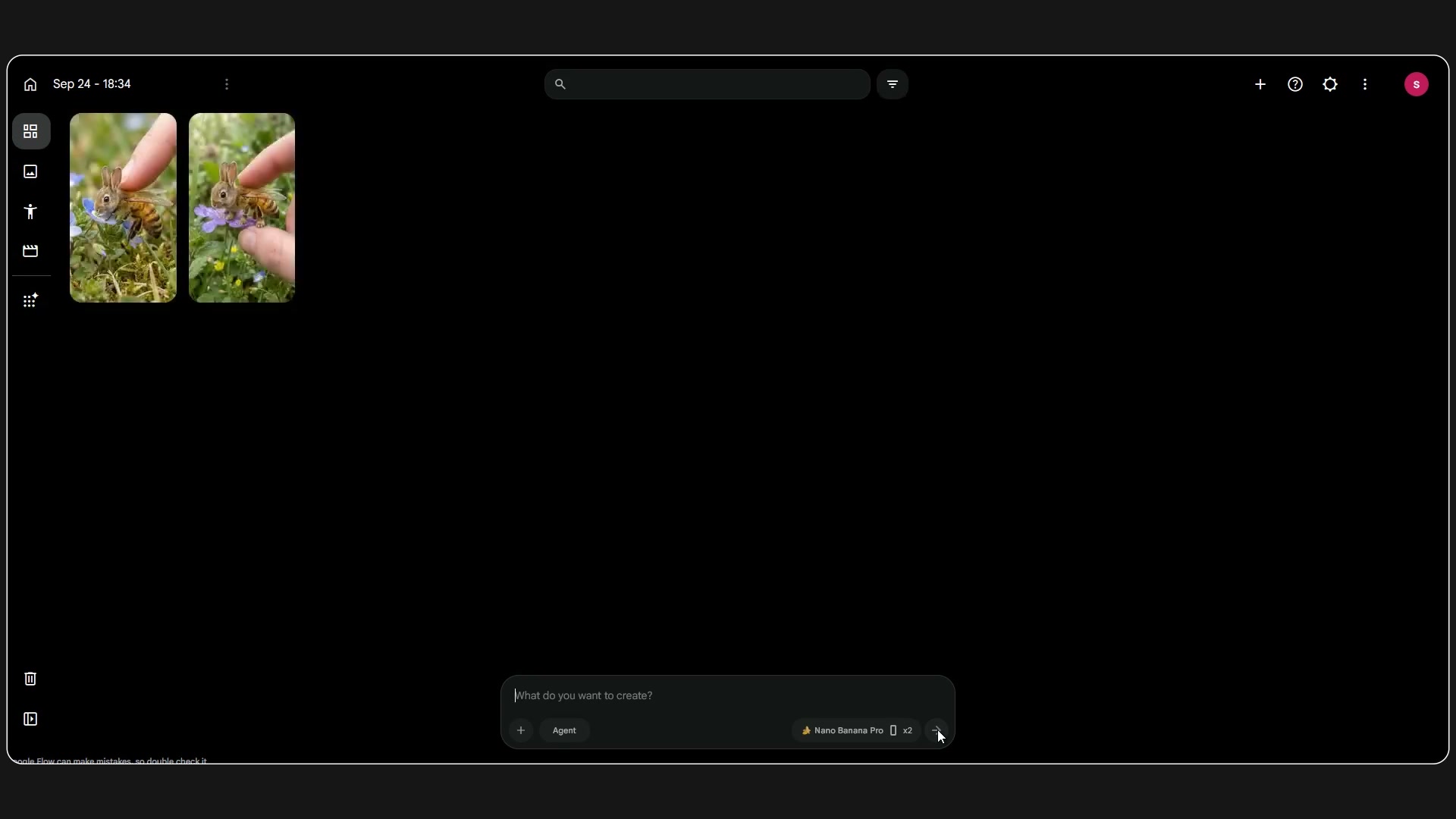
Prompt / Settings:
Mode: Image
Aspect Ratio: 9:16
Model: Nano Banana Pro
Prompt: [Generated Image Prompt from Step 1]
Step 3: Animate into POV Video with Omni Flash [Timestamp: 02:08]
Select the best-generated image, click the three-dot menu, and choose 'Add to prompt' to lock it as your visual reference. Switch to video mode, copy and paste the Video Prompt from ChatGPT, select the Omni Flash model, set resolution to 720p, duration to 10 seconds, and initiate video generation.
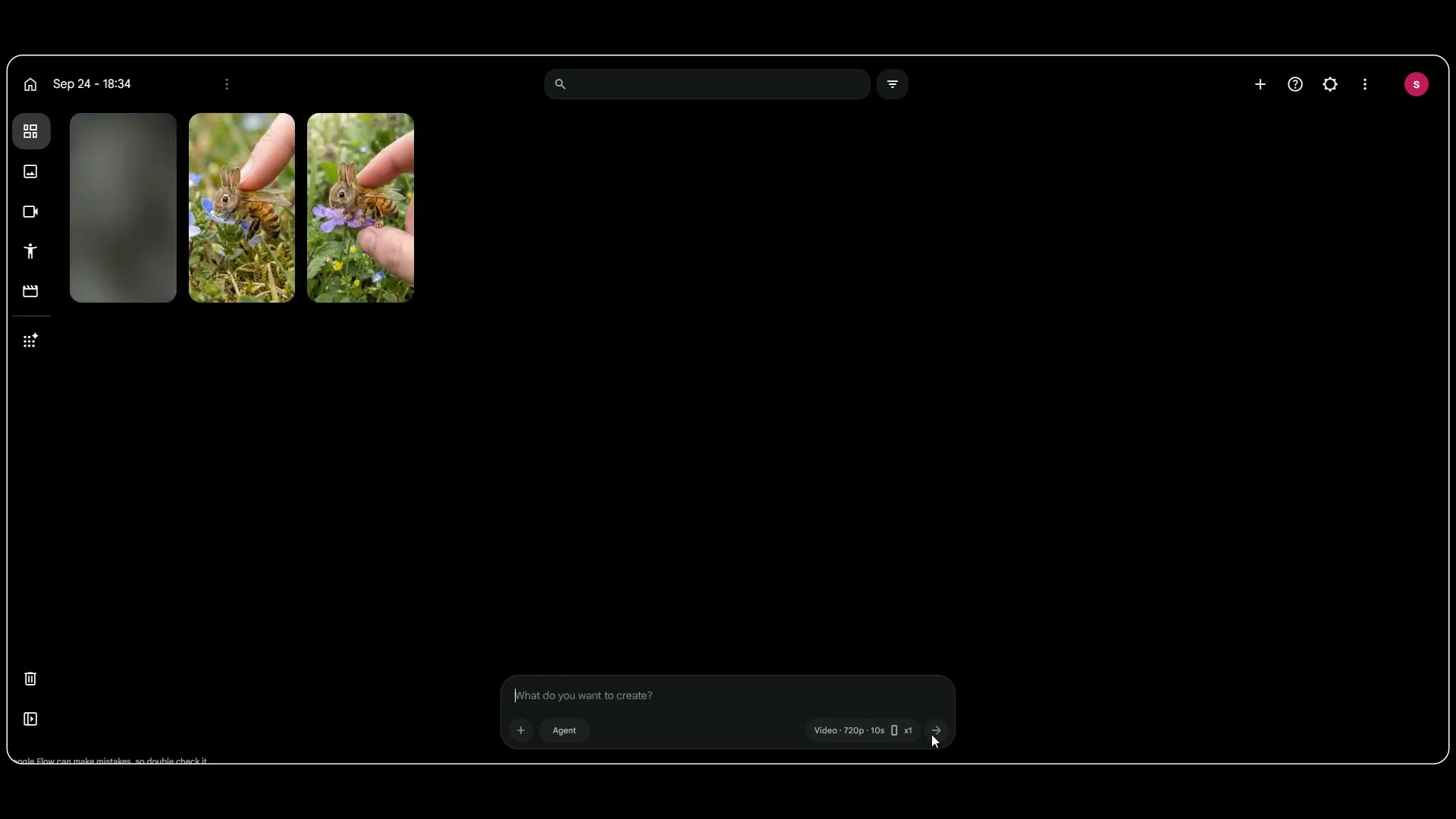
Prompt / Settings:
Mode: Video
Reference Image: Attached base image from Step 2
Aspect Ratio: 9:16
Model: Omni Flash
Quality: 720p
Duration: 10s
Number of Videos: 1
Prompt: [Generated Video Prompt from Step 1]
💡 Key Takeaways & Pro Tips
- Scale Contrast Drives Virality: The extreme size difference between a human finger and an insect-sized mammal creates instant curiosity and high audience retention.
- Avoid Normal Animal Bodies: Make sure the insect dictates the creature's core body anatomy, wings, and abdomen, while the animal defines only the head, expressions, and tiny paws.
- Use First-Frame Anchoring: Always load the rendered still into the video generator as an image reference to prevent the creature's hybrid anatomy or color palette from shifting.
📌 Original Source & Attribution
- Source Video: How to Create Viral AI Miniature Creatures | Animal × Insect Prompt 100% FREE with Chat GPT & FLOW
- Original URL: https://www.youtube.com/watch?v=EjQpotURn74
- Credit: Pixora


