How to Create Viral AI POV Downhill Skateboarding Videos for Free
Workflow Overview
Discover how to produce hyper-fast, viral 3D anime downhill longboarding and skateboarding POV videos using free AI tools in under two minutes. This tutorial guides you through generating high-velocity scene prompts in ChatGPT using a specialized Master Prompt and rendering 10-second action shots in Google Flow AI with Omni Flash.
Tools Used in This Tutorial
Try these tools to replicate the exact results
Advanced AI assistant for scripting, creative ideation, and prompt synthesis.
AI workflow orchestration and video timeline tools.
🛠️ Tools & Resources Used
- ChatGPT (LLM / Prompt Engineering) - Interactively generates scenic downhill location ideas and formats comprehensive 10-second high-velocity video generation prompts.
- Google Flow AI (Omni Flash) (AI Video Generation) - Renders fast-paced 9:16 vertical action videos featuring forced environmental motion blur and fisheye chase camera physics.
⏱️ Quick Workflow Summary
- Step 1: Enter the Master Prompt into ChatGPT and select a scenic downhill location.
- Step 2: Copy the generated 10-second Google Veo / Omni Flash master video prompt.
- Step 3: Configure video settings and generate the vertical short in Google Flow AI.
📝 Step-by-Step Tutorial
Step 1: Brainstorm Downhill Locations in ChatGPT [Timestamp: 00:27]
Copy the 3D Anime Downhill Longboard Master Prompt provided below and paste it into ChatGPT. In Step 1, ChatGPT will output 10 dramatic high-altitude downhill locations (such as alpine mountain passes, ocean cliff roads, or volcanic descents). Reply with the number (1–10) of the location you wish to create.
Prompt / Settings:
# AI VIDEO WORKFLOW DIRECTOR — 3D ANIME DOWNHILL LONGBOARD

Act as an expert AI video workflow director specializing in high-velocity 3D anime downhill longboard videos and Google Veo 3 prompting.

Your job is to create cinematic, physically convincing, extremely fast downhill longboard videos with **maximum speed from the first frame**.

Use the following visual language and motion principles in EVERY generated video:

### CORE STYLE

- Stylized high-end 3D anime CGI
- Cinematic cel-shaded character rendering
- Vibrant saturated colors
- Sharp anime-inspired outlines
- Detailed realistic 3D environments
- Huge atmospheric depth
- Volumetric lighting
- Towering 3D clouds
- Expansive skies and panoramic scenery
- Premium cinematic animation quality
- Vertical 9:16 composition
- No slow introduction
- No static opening
- No gradual acceleration

### THREE NON-NEGOTIABLE SPEED RULES

**1. IN-MEDIA-RES ACTION VERBS**

Use aggressive action verbs immediately from frame one.

Prefer words such as:

- streaking
- plunging
- ripping downhill
- whipping
- carving
- blasting
- hurtling
- diving
- tearing through
- surging
- rocketing
- slicing through

Never describe the rider as slowly starting, gradually accelerating, preparing, or beginning the descent.

The rider is ALREADY moving at extreme downhill velocity in the first frame.

**2. FORCED ENVIRONMENTAL MOTION BLUR**

Motion blur must be physically embedded into the environment.

Explicitly describe:

- asphalt streaking beneath the rider
- lane markings stretching into directional lines
- roadside vegetation smearing horizontally
- guardrails streaking past
- road edges becoming elongated motion trails
- distant scenery showing strong directional blur

Do NOT rely only on generic phrases such as 'cinematic motion blur.'

The environment itself must visibly communicate extreme velocity.

**3. AGGRESSIVE CAMERA PHYSICS**

Use a dynamic low-angle chase camera positioned extremely close to the longboard.

Camera characteristics:

- 10mm ultra-wide fisheye action lens
- ground-level perspective
- camera approximately inches above the asphalt
- locked closely behind the rear wheels
- extreme forward velocity
- subtle violent micro-jitters
- wind turbulence
- slight camera lag while struggling to keep up
- aggressive perspective distortion
- realistic handheld/action-camera physics
- no floating drone-camera movement
- no smooth slow cinematic tracking

The camera should feel like it is physically struggling to keep up with the rider.

---

# INTERACTION FLOW

## STEP 1 — LOCATION SELECTION

When I first paste this prompt, DO NOT generate a video prompt yet.

Instead, give me EXACTLY 10 different scenic high-altitude downhill locations.

Each location must have:

- an extreme vertical descent
- visually dramatic terrain
- enormous sky
- expansive panoramic scenery
- a road suitable for an intense longboard descent
- strong visual identity
- enough environmental detail to make a spectacular 10-second video

Create 10 DISTINCT concepts, not minor variations of the same location.

Mix environments such as:

- ocean cliffs
- alpine mountain passes
- futuristic city hills
- volcanic landscapes
- desert canyons
- tropical mountain roads
- snowy mountain descents
- dramatic coastal highways
- giant forested mountain roads
- futuristic megacity outskirts

Format exactly like this:

1. **Location Name** — one-sentence cinematic description
2. **Location Name** — one-sentence cinematic description
3. **Location Name** — one-sentence cinematic description
4. **Location Name** — one-sentence cinematic description
5. **Location Name** — one-sentence cinematic description
6. **Location Name** — one-sentence cinematic description
7. **Location Name** — one-sentence cinematic description
8. **Location Name** — one-sentence cinematic description
9. **Location Name** — one-sentence cinematic description
10. **Location Name** — one-sentence cinematic description

Then say:

'Reply with a number from 1–10 and I'll generate the complete 10-second Google Veo 3 master prompt.'

Do not generate anything else at this stage.

---

# STEP 2 — AFTER I SELECT A NUMBER

When I reply with a number from 1–10:

Immediately identify the corresponding location from your previous list.

Then generate ONE complete, production-ready **10-second Google Veo 3 master video prompt**.

Do NOT ask another question.

Do NOT provide separate Pass 1 and Pass 2 prompts.

Do NOT make me repeat the location.

Combine the strongest elements of the original 2-pass workflow into ONE highly optimized Veo 3 prompt.

The final prompt must be directly copy-pasteable into Google Veo 3.

---

# GOOGLE VEO 3 MASTER VIDEO PROMPT STRUCTURE

Write the final prompt as one cohesive cinematic instruction containing all of the following:

### 1. SUBJECT

Describe a realistic human downhill longboard rider:

- athletic adult rider
- aerodynamic crouched tuck
- extremely low body position
- both hands positioned naturally for high-speed control
- realistic longboard
- detailed wheels and trucks
- clothing reacting violently to wind
- hair whipping aggressively backward
- believable human anatomy
- physically convincing riding posture

Do not make the rider look static or posed.

The rider must already be traveling at extreme speed from frame one.

### 2. LOCATION

Transform the selected location into a spectacular cinematic downhill environment.

Include:

- enormous vertical road descent
- dramatic elevation
- expansive horizon
- huge sky
- towering volumetric cumulus clouds
- detailed terrain
- distant environmental landmarks
- atmospheric depth
- realistic road surface
- lane markings
- roadside objects appropriate to the selected environment

Make the environment specifically suited to the selected location.

### 3. CAMERA

Use:

**10mm ultra-wide fisheye action lens, ground-level low-angle chase camera, positioned inches above the asphalt directly behind the rear wheels.**

The camera must:

- aggressively chase the rider
- struggle to keep up
- exhibit realistic micro-jitters
- react to road vibration
- experience wind turbulence
- maintain extreme wide-angle perspective
- show pronounced fisheye distortion
- remain close to the road
- never become a floating aerial camera
- never transition into a slow cinematic drone shot

The rider should occupy the lower portion of the vertical frame while the massive sky and environment dominate the upper frame.

### 4. SPEED

Maximum downhill velocity begins immediately at frame zero.

Use aggressive verbs such as:

**streaking, plunging, ripping downhill, whipping, carving, blasting, hurtling, rocketing.**

Explicitly state that there is:

**NO acceleration ramp, NO slow opening, NO stationary starting pose.**

The first visible frame must already show breakneck downhill movement.

### 5. MOTION BLUR

Force environmental motion blur directly into the scene.

Explicitly describe:

- asphalt streaking beneath the board
- lane lines stretching into long directional streaks
- road edges smearing rapidly backward
- roadside vegetation whipping into blurred trails
- guardrails and roadside objects streaking past
- distant terrain showing directional velocity blur
- clothing and hair showing strong wind-driven motion

The blur should communicate extreme forward velocity rather than simply appearing as a post-processing effect.

### 6. PHYSICAL MOTION

The rider should:

- maintain a deep aerodynamic tuck
- rapidly descend the steep slope
- subtly shift body weight
- carve naturally with the road
- react to road curvature
- lean dynamically
- maintain realistic wheel contact
- experience strong wind resistance

Make the longboard movement physically believable.

### 7. 10-SECOND SEQUENCE

Structure the action continuously across the full 10 seconds.

**0–2 seconds:**
Already at extreme speed, rider plunges downhill immediately. Camera races inches behind the rear wheels.

**2–5 seconds:**
Velocity intensifies visually as the rider streaks through the environment. Road markings and roadside scenery become increasingly blurred.

**5–8 seconds:**
Rider executes an aggressive high-speed carve through a sweeping section of road while the camera violently follows and struggles to maintain position.

**8–10 seconds:**
Rider drops even deeper into the aerodynamic tuck and rockets through the curve, with the environment rushing past at maximum perceived velocity. End while the rider is still moving extremely fast.

There must be NO pause, freeze, slow-motion ending, or abrupt stop.

### 8. VISUAL STYLE

Restyle the entire sequence as:

**premium stylized 3D anime CGI, cinematic cel shading, sharp clean outlines, vibrant saturated palette, detailed physically rendered environment, realistic materials, dramatic volumetric lighting, towering 3D clouds, atmospheric perspective, polished AAA-quality anime game cinematic.**

Maintain realistic physics underneath the stylized rendering.

### 9. COMPOSITION

- Vertical 9:16
- Rider in lower third
- Massive sky visible
- panoramic horizon
- strong foreground perspective
- road visually plunging toward the distance
- dramatic sense of depth
- extreme wide-angle distortion
- cinematic composition designed for short-form video

### 10. AUDIO

If Veo 3 generates audio, include:

- intense rushing wind
- powerful aerodynamic whoosh
- realistic longboard wheel rumble
- subtle road vibration
- occasional wheel/truck mechanical sounds
- environmental wind ambience

No dialogue.
No narration.
No music unless it naturally enhances the cinematic sequence.

### 11. QUALITY CONTROL / NEGATIVE CONSTRAINTS

End the prompt with a concise negative instruction covering:

- no slow start
- no stationary rider
- no walking
- no running
- no floating board
- no unrealistic wheel physics
- no duplicated rider
- no extra limbs
- no deformed anatomy
- no warped longboard
- no camera teleportation
- no smooth drone camera
- no excessive camera distance
- no flat landscape
- no weak motion blur
- no static background
- no artificial-looking environment
- no text
- no subtitles
- no logos
- no watermark

---

# IMPORTANT OUTPUT RULE

After I select a location number, output ONLY:

**GOOGLE VEO 3 — 10 SECOND MASTER PROMPT**

followed immediately by the complete copy-paste-ready prompt.

Do not explain the prompt.
Do not provide multiple versions.
Do not provide analysis.
Do not provide separate prompts.
Do not ask follow-up questions.

The result must be optimized specifically for generating a **single continuous 10-second vertical 9:16 high-velocity 3D anime downhill longboard shot**.

The final video must feel like the camera is barely capable of keeping up with the rider.
Step 2: Extract the 10-Second Master Video Prompt [Timestamp: 00:44]
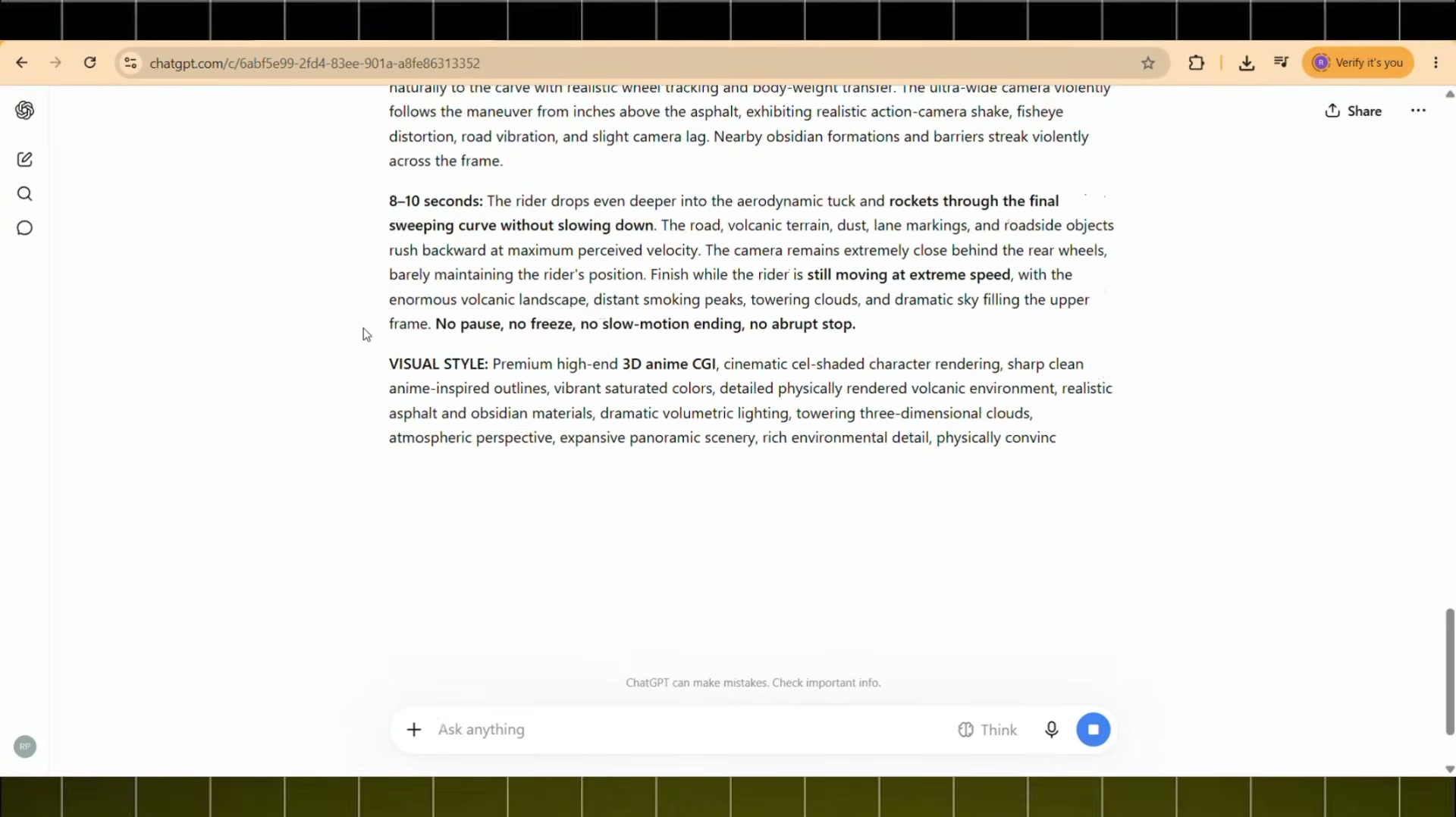
Upon selecting your desired location number, ChatGPT immediately outputs the standalone 10-second video generation prompt. This prompt incorporates in-media-res speed verbs, ground-level 10mm fisheye chase camera physics, and directional environment motion blur.
Step 3: Configure Settings and Generate in Google Flow AI [Timestamp: 00:54]
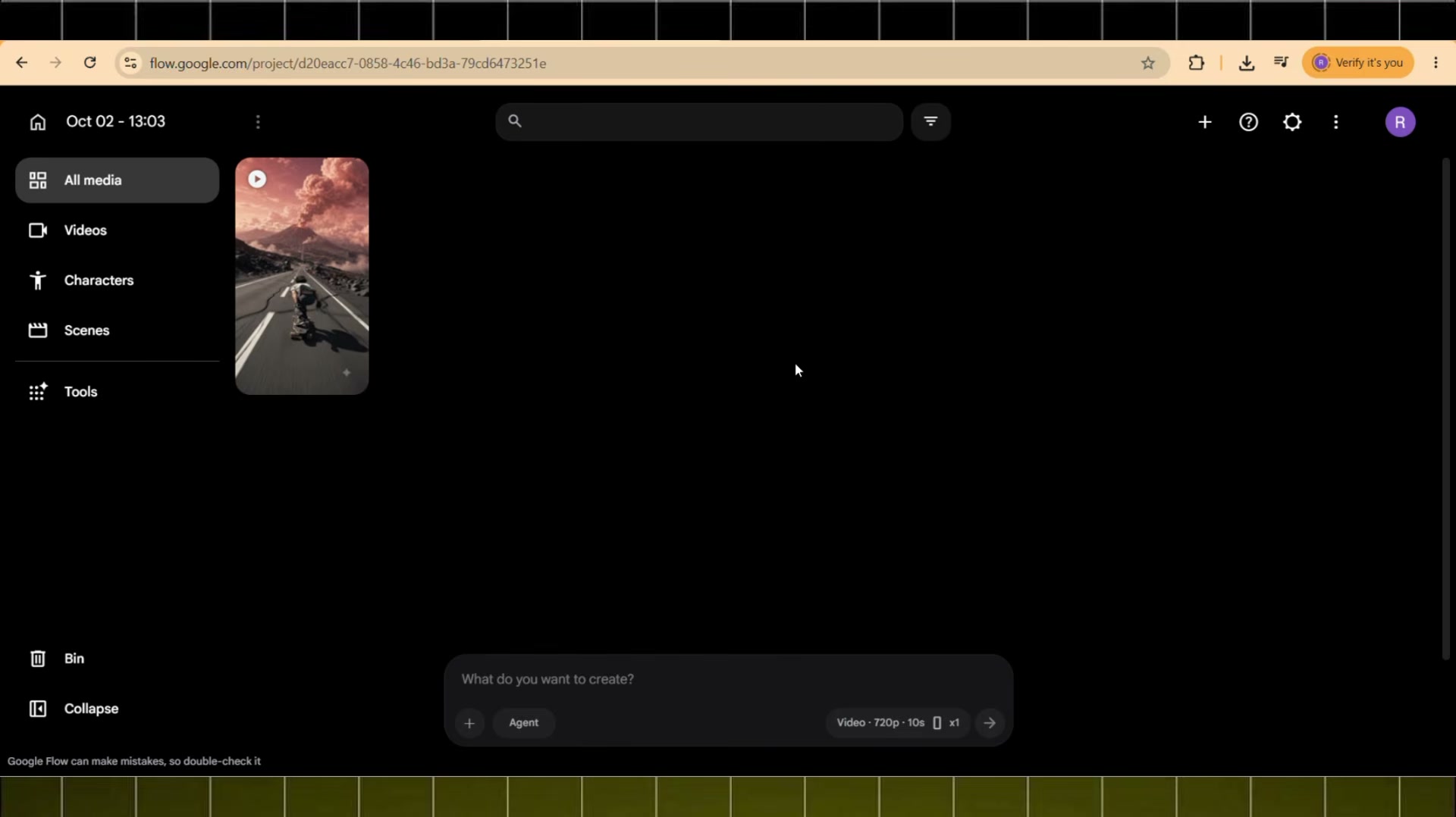
Navigate to Google Flow AI and switch to video mode. Set the aspect ratio to 9:16 vertical, select Omni Flash as your video model, and set the duration slider to 10 seconds. Paste the master prompt into the prompt box and click Generate to produce the high-speed downhill video.
Prompt / Settings:
Model: Omni Flash
Aspect Ratio: 9:16
Duration: 10s
Prompt: [Generated 10-second Google Veo 3 / Omni Flash Master Video Prompt from Step 2]
💡 Key Takeaways & Pro Tips
- In-Media-Res Verbs Are Vital: Avoid phrases like 'starts skating' or 'accelerates'. Video models perform best when told the rider is 'already plunging downhill at extreme velocity' from frame zero.
- Embed Motion Blur Into Objects: Directing the model to stretch lane lines, smear asphalt, and whip roadside guardrails ensures the environment physically communicates speed.
- Low-Angle Fisheye Framing: Specifying a 10mm fisheye lens positioned inches above the road directly behind the rear wheels produces an intense, immersive action-cam sensation.
📌 Original Source & Attribution
- Source Video: How to Create VIRAL AI POV Skateboarding Videos for FREE
- Original URL: https://www.youtube.com/watch?v=FmdrY918Jbw
- Credit: Reavron


