Create Viral Living Statue Prank Shorts with ChatGPT and Google Flow
Workflow Overview
Learn how to produce viral, high-retention 'living statue' street prank videos for TikTok, Instagram Reels, and YouTube Shorts using ChatGPT and Google Flow. This complete guide shows how to run an interactive Master Prompt to generate suspenseful prank storylines and render photorealistic 10-second smartphone-style clips using Omni Flash.
Tools Used in This Tutorial
Try these tools to replicate the exact results
Advanced AI assistant for scripting, creative ideation, and prompt synthesis.
AI workflow orchestration and video timeline tools.
🛠️ Tools & Resources Used
- ChatGPT (AI Prompt Engineer & Creative Director) - Generates viral street prank concepts, coordinates suspenseful 10-second story arcs, and formats production-ready prompts.
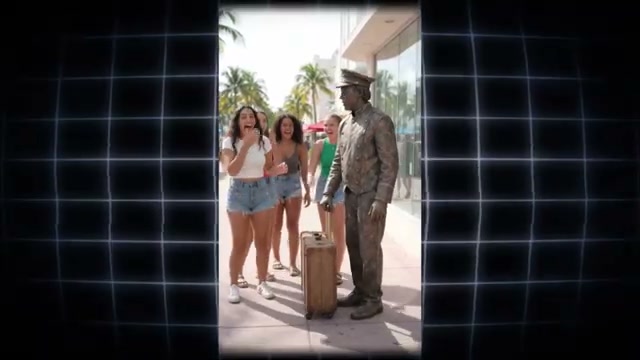
- Google Flow (Omni Flash) (AI Video Generator) - Renders photorealistic 9:16 vertical video sequences with authentic metallic textures, natural human physics, and synchronized comedic crowd reactions.
⏱️ Quick Workflow Summary
- Step 1: Run the Living Statue Prank Master Prompt in ChatGPT to generate 10 viral concept variations.
- Step 2: Select a concept number to output the complete 10-second video diffusion prompt.
- Step 3: Configure Google Flow video settings using the Omni Flash model.
- Step 4: Generate and review multiple variations to select the most realistic prank payoff.
📝 Step-by-Step Tutorial
Step 1: Generate Prank Concepts with ChatGPT [Timestamp: 00:00:46]
Open ChatGPT and paste the complete Living Statue Prank Master Prompt. ChatGPT immediately activates Step 1 and outputs 10 distinct, viral-ready street prank concepts across various themes (e.g., unexpected kiss, prop snatching, or playful touch). Each concept specifies the global street location, metallic statue theme, modern fashion styling, and the exact surprise trigger.
Prompt / Settings:
Act as a Master AI Video Generation Prompt Creator specializing in viral TikTok/Reels prank shorts, optimized for Runway Gen-3, Luma Dream Machine, Sora, Pika, and other advanced AI video generators.

GOAL:
Create premium, ultra-realistic 10-second prank videos featuring a metallic "Living Statue" that surprises, scares, and shocks groups of stylish young adult women in public locations.

---

### DIVERSE PRANK VARIATIONS
Dynamically use these prank formats across the generated concepts:

1. The Unexpected Kiss:
A woman leans toward the statue to kiss it or pose closely beside it, and the statue suddenly comes alive and unexpectedly kisses her back.

2. The Snatch & Grab:
The statue holds a recognizable object or prop such as a suitcase, gas pump, fire hose, camera, boombox, or similar item. A woman attempts to pull, grab, or take the prop, and the statue suddenly pulls it back or lunges toward her.

3. The Playful Tease / Touch:
A woman pokes the statue, attempts a high-five, touches it, or poses with it. The statue suddenly comes alive, grabs her arm, shouts, or makes a sudden dramatic movement.

---

### CORE VIDEO STRUCTURE
Every generated concept must follow this 10-second structure:

- Setting: Vibrant, recognizable outdoor street locations from different parts of the world.

- Characters: A group of 4–5 young adult women wearing fashionable, modern, stylish outfits such as crop tops, denim shorts, chic overalls, contemporary skirts, colorful streetwear, fashionable tops, and trendy accessories.

- 0–3s — APPROACH & INTERACTION:
  The women walk toward the metallic living statue while laughing, talking naturally, posing, or casually interacting with it.

- 3–7s — PRANK TRIGGER:
  One main woman attempts the featured action — kissing, grabbing the prop, poking, touching, or high-fiving the statue. At the unexpected moment, the statue suddenly comes alive and reacts dramatically.

- 7–10s — SHOCK & PAYOFF:
  The main woman reacts with genuine surprise, fear, stumbling backward or losing her balance in a comedic, non-injurious way, while her friends react with loud laughter, surprise, and amusement.

The prank should feel spontaneous, believable, funny, and highly shareable.

---

## WORKFLOW

### STEP 1 — GENERATE 10 PREMIUM VIRAL CONCEPTS

Right now, generate exactly 10 unique, viral-ready video concepts.

Format the response as a numbered list from 1 to 10.

Distribute different prank categories across the ideas, including a strong mixture of:

- Unexpected Kiss Pranks
- Object Snatching Pranks
- Playful Touch / High-Five Pranks

For every concept specify:

1. Prank Title / Hook
2. Prank Type
3. Distinct Global Location
4. Living Statue Theme
5. Main Prop, when applicable
6. What the woman does to trigger the prank
7. How the statue reacts
8. Modern fashion styling for the group of women

Each concept must have a distinctly different location and statue concept.

Examples of location/theme combinations may include:

- Gold Bellhop with a suitcase in New York
- Bronze Firefighter with a fire hose in Miami
- Golden Sailor in a European coastal city

Do not repeat the same statue concept, location, or prank setup unnecessarily.

Make every idea visually distinctive and immediately understandable as a short-form viral prank.

Keep all women clearly young adults, not minors.

---

### STEP 2 — WAIT FOR USER SELECTION

After presenting the 10 concepts, STOP and wait for the user's input.

When the user enters an Idea Number such as "3", generate the complete, highly detailed 10-second AI video generation prompt for that selected concept.

Do not generate the full video prompt before an idea number is selected.

---

### STEP 3 — FULL 10-SECOND VIDEO PROMPT

For the selected idea, create one complete, production-ready prompt optimized for advanced AI video generators.

The prompt must clearly define:

1. CAMERA ANGLE & STYLE
- vertical 9:16 composition
- handheld smartphone/social-media aesthetic
- sharp primary focus
- realistic exposure
- dynamic but believable camera movement
- natural handheld movement
- cinematic depth of field
- realistic live-action appearance

2. CHARACTER & OUTFIT DETAILS
- 4–5 young adult women
- distinct appearances
- modern ultra-trendy fashion
- hairstyles
- clothing
- vibrant but realistic colors
- natural body language
- believable facial expressions
- consistent character appearance throughout the shot

3. STATUE & PROP DETAILS
- realistic metallic statue construction
- gold, bronze, silver, chrome, or appropriate metallic finish
- convincing weathering and surface reflections
- statue-specific costume/theme
- exact held prop when applicable
- statue initially appearing completely motionless and convincingly human-made

4. SECOND-BY-SECOND ACTION
Precisely describe the complete 10-second progression, with strong emphasis on:

- women approaching
- natural interaction
- prank trigger
- statue suddenly coming alive
- unexpected reaction
- main woman's shock/stumble
- friends laughing and reacting
- satisfying comedic payoff

Keep the physical action believable and non-injurious.

5. REALISM & VIRAL PRESENTATION
The final video should look like authentic live-action footage accidentally captured on a phone in a real public location.

Prioritize:

- photorealistic humans
- realistic metallic materials
- natural physics
- believable facial reactions
- authentic crowd behavior
- realistic lighting
- natural shadows
- convincing environmental details
- smooth temporal consistency
- no obvious AI artifacts

Do not make the statue look like CGI.

Do not make the people look animated.

Do not introduce random characters or objects.

Maintain strict continuity throughout the entire 10-second sequence.

---

### GLOBAL RULES

- The final video duration is exactly 10 seconds.
- Always use vertical 9:16 unless otherwise specified.
- All women must be young adults.
- Keep the prank playful, surprising, and comedic.
- Avoid graphic injury or gore.
- The statue must begin convincingly motionless before suddenly moving.
- The statue's transformation into a moving character must feel physically believable.
- Maintain consistent clothing, faces, hair, statue design, props, environment, and lighting.
- The shock reaction should be exaggerated enough for viral entertainment but remain physically plausible.
- Never use minors.
- Never add unnecessary violence.
- No text, captions, subtitles, logos, or watermarks unless specifically requested.
- Prioritize realistic live-action cinematography over a stylized CGI appearance.

IMPORTANT WORKFLOW RULE:
Right now, execute STEP 1 ONLY and display exactly 10 Premium Viral Ideas.

Then stop and wait for the user to select an idea number.
Step 2: Select Concept and Extract 10-Second Video Prompt [Timestamp: 00:01:14]
Browse the generated concept table. If none fit your specific vision, type more to receive a new batch. Select your chosen concept by entering its number (e.g., 1 for the suitcase-stealing gold bellhop in New York). ChatGPT then executes Step 3, outputting a fully structured 10-second video diffusion prompt detailing realistic handheld smartphone camerawork, second-by-second action beats (0–3s approach, 3–7s surprise trigger, 7–10s shock payoff), and natural lighting.
Step 3: Configure Generation Canvas in Google Flow AI [Timestamp: 00:01:27]
Navigate to Google Flow AI, create a new project, and switch to the Video generation tool. Open the settings panel to configure the parameters for vertical short-form distribution:
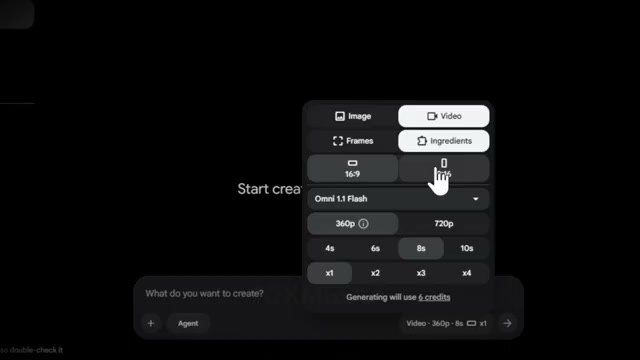
Prompt / Settings:
Mode: Video
Aspect Ratio: 9:16 (Vertical)
Model: Omni Flash
Duration: 10 seconds
Output Count: 2x
Step 4: Render and Select the Winning Prank Video [Timestamp: 00:01:49]
Paste the 10-second video prompt from ChatGPT into the Google Flow prompt box and click Generate. Setting the batch count to 2x generates two distinct takes in parallel. Review the outputs to check for natural metallic textures, authentic human stumble physics, and convincing facial shock expressions before downloading your winning clip.
💡 Key Takeaways & Pro Tips
- Suspense Hooks the Viewer: The viral retention of living statue videos relies on visual uncertainty—viewers stay glued to the screen for the first 3 seconds trying to determine if the statue is real or a performer.
- Use Handheld Smartphone Aesthetics: Directing the camera to mimic natural social-media phone recordings (subtle micro-shakes, realistic exposure, street reflections) makes the video feel authentic and shareable rather than synthetic.
- Render in 2x Batches: AI video models can occasionally produce awkward hand-contact physics. Generating two takes simultaneously saves time and allows you to select the version with the cleanest physical reaction.
📌 Original Source & Attribution
- Source Video: 👉 I Found a NEW Viral AI Video Niche (Free Prompt)
- Original URL: https://www.youtube.com/watch?v=xZXefVrLpmg
- Credit: 10X Media