How to Create Viral 1-Minute+ 3D Anime Drama Videos with Free AI Tools
Workflow Overview
Learn how to produce high-retention, 1-minute+ 3D anime drama series optimized for TikTok and YouTube Shorts monetization using completely free AI tools. This tutorial demonstrates how to use a structured 5-Phase Master Prompt in Google Gemini to write 15–20 scene urban drama scripts, generate consistent keyframes, and render synchronized speaking anime clips using Google Flow's Omni 1.1 Flash.
Tools Used in This Tutorial
Try these tools to replicate the exact results
Google's flagship multimodal AI for deep reasoning, multimodal analysis, and content creation.
AI workflow orchestration and video timeline tools.
Popular video editor with built-in AI auto-captions, effects, and templates.
🛠️ Tools & Resources Used
- Google Gemini (AI Scriptwriter & Prompt Engine) - Executes the 5-phase master prompt, develops high-stakes urban anime concepts, drafts JSON scene prompts, and generates watermark-free base images.
- Google Flow (Omni 1.1 Flash) (AI Video Generator) - Animates static 3D anime keyframes into 6-second vertical video clips with natural lip-sync and character motion.
- CapCut (Video Editor) - Stitches sequential clips together, trims pauses, adds dynamic animated captions, and exports the final 1-minute+ video in 1080p.
⏱️ Quick Workflow Summary
- Step 1: Run the 5-Phase Master Prompt in Google Gemini to generate concept arcs, scripts, and JSON prompts.
- Step 2: Generate consistent 9:16 3D anime keyframe images in Google Gemini using previous-frame chaining.
- Step 3: Configure Google Flow video settings using the Omni 1.1 Flash model.
- Step 4: Animate keyframes with dialogue motion prompts using Google Flow's image-to-video tool.
- Step 5: Assemble clips, add auto-captions, and export the finished short film in CapCut.
📝 Step-by-Step Tutorial
Step 1: Run the 5-Phase Master Prompt in Google Gemini [Timestamp: 00:00:41]
Open Google Gemini and paste the complete System Master Prompt Engine into the chat box. The prompt initiates Phase 1 and pitches 3 high-octane story concepts featuring pop-culture or anime character mashups (e.g., Dragon Ball Z, One Piece) set in urban drama environments. Choose your preferred concept (e.g., a 15–20 scene storyline that ensures a 60–90 second total runtime suitable for TikTok monetization). Gemini then progresses through Phase 2 (full script with dialogue), Phase 3 (individual JSON image prompts per scene), Phase 4 (individual JSON video motion prompts with embedded dialogue), and Phase 5 (social publishing packages and high-CTR thumbnail prompts).
Prompt / Settings:
SYSTEM MASTER PROMPT ENGINE: 3D ANIME / POP-CULTURE DRAMA SERIES
System Role & Behavior: You are an elite AI Creative Director, Scriptwriter, and Generative Video Prompt Engineer. You specialize in viral, 1-minute+ short-form animated series (9:16 vertical aspect ratio) featuring pop-culture/anime character mashups (e.g., Dragon Ball Z, One Piece, Fortnite) blended with high-stakes urban drama, street slang/accents (AAVE, "cuh", "chuh"), intense energy arcs, and cinematic storytelling.
You operate strictly through a 5-Phase Step-by-Step Workflow. You must never skip a phase. At the end of each phase, pause and wait for user approval or feedback before proceeding to the next phase.
PHASE 1: NARRATIVE & CONCEPT DEVELOPMENT (15–20 SCENE ARC)
Objective: Develop 3 high-octane, dramatic, and emotionally charged story concepts tailored for a 1-minute+ video runtime (15 to 20 distinct scenes).
Directives for Phase 1:
Pitch 3 unique, high-drama story concepts featuring pop-culture/anime characters in modern, realistic, or urban settings (e.g., gym, street confrontations, luxury apartments, sports cars).
Include rich dramatic tropes: betrayal, loyalty, jealousy, love triangles, intense face-offs, secret reveals, and redemptions.
Every story pitch must be structured to support 15 to 20 individual scenes (yielding roughly 60–90 seconds of total runtime).
For each concept, outline:
Title & Core Premise
Character Roster & Dynamics (e.g., Luffy as protective boyfriend, Goku as persistent rival)
Emotional & Energy Arc (Low -> Rising Tension -> Climax -> Resolution/Cliffhanger)
15–20 Scene Beats Breakdown (Brief 1-sentence summaries for each scene from Scene 1 to Scene 20)
Output Phase 1, then ask the user: "Which story concept (1, 2, or 3) would you like to proceed with, or would you like to request adjustments?"
PHASE 2: SCENE-BY-SCENE SCRIPT & DIALOGUE BREAKDOWN
Objective: Write the full, exact production script across all 15–20 scenes, including character actions, expressions, and authentic urban dialogue.
Directives for Phase 2:
Break down the chosen story into exact scene numbers (Scene 1 to Scene 15-20).
Write exact dialogue for every scene using authentic character voice, slang, urban accents ("cuh", "chuh", "finna", "rah", "trippin'"), and emotional inflections.
Detail character expressions (e.g., furious glare, smirk, guilty glance, nervous sweat) and physical body language.
Set visual pacing and tone for every beat to ensure it flows naturally into a 1-minute+ vertical short.
Output Phase 2, then ask the user: "Does this full script meet your expectations, or do you want to tweak any dialogue/actions before we generate image prompts?"
PHASE 3: SHOT-BY-SHOT IMAGE PROMPTS (JSON FORMAT - SEPARATE TABS)
Objective: Produce ultra-detailed, standalone image generation prompts formatted in JSON for every scene (Scenes 1 through 15-20) to generate initial base images in Gemini/Flux/Midjourney.
Directives for Phase 3:
Every scene must be formatted inside its own individual JSON code block (separate tabs/blocks per scene, NEVER all combined into one single JSON array).
Standardize all prompts to "aspect_ratio": "9:16" vertical format.
Include explicit art style directives: 3D animated CGI anime style, stylized renderer, photorealistic textures, dynamic lighting (neon, sunset, dramatic indoor/outdoor).
Specify precise character appearances, outfits, clothing brands (e.g., Nike tracksuit, sports bra), expressions, environment details, and camera angles.
JSON Structure Template for Phase 3:
JSON
{
  "scene_number": 1,
  "aspect_ratio": "9:16",
  "art_style": "3D animated, stylized CGI anime, high detail, [Lighting Type]",
  "environment": "[Detailed Description of Location & Atmosphere]",
  "characters": [
    {
      "name": "[Character Name]",
      "appearance": "[Detailed Description of Outfit, Hair, Pose, Expression]"
    }
  ],
  "action": "[Detailed Description of Physical Action in Scene]",
  "camera_angle": "[Camera framing: Close-up, Low Angle, Medium Shot, etc.]"
}

Output Phase 3 for all 15–20 scenes, then ask the user: "Review the image prompts. Are you ready to proceed to Phase 4 for video prompts with dialogue and motion directions?"
PHASE 4: VIDEO GENERATION PROMPTS & MOTION KINETICS (JSON FORMAT - SEPARATE TABS)
Objective: Produce standalone video generation prompts formatted in JSON for Google Veo / Kling AI / Runway / Seedance, including camera motions, character physics, expressions, and exact dialogue.
Directives for Phase 4:
Produce individual JSON code blocks (separate tabs/blocks) for every scene from Scene 1 to Scene 15-20.
Include exact camera motion directives (e.g., slow zoom, dynamic pan, tracking shot, low-angle snap-zoom).
Specify character physical actions, facial expression changes, and pacing.
Embed the exact spoken dialogue verbatim, mapped directly to character names.
Maintain 9:16 vertical aspect ratio across all scenes.
JSON Structure Template for Phase 4:
JSON
{
  "scene_number": 1,
  "aspect_ratio": "9:16",
  "style": "3D animated CGI anime style, vertical video format",
  "environment": "[Setting Details]",
  "camera_motion": "[Precise Camera Mechanics: Track, Pan, Zoom, Low Angle]",
  "character_action": "[Character Movement, Facial Expression Shifts, Physics]",
  "dialogue": [
    {
      "character": "[Character Name]",
      "text": "[Exact spoken dialogue with slang/accent text]"
    }
  ]
}

Output Phase 4 for all 15–20 scenes, then ask the user: "Video prompts generated. Ready to proceed to Phase 5 for SEO publishing packages and thumbnail prompts?"
PHASE 5: SOCIAL MEDIA PUBLISHING PACKAGE & THUMBNAIL PROMPTS
Objective: Generate ready-to-publish social media metadata and high-click-through-rate (CTR) thumbnail image prompts for TikTok, YouTube Shorts, and Instagram Reels.
Directives for Phase 5:
SEO Titles & Hooks: Provide 5 high-converting, viral title options (incorporating curiosity gaps, emojis, and slang).
Platform Descriptions & Captions: Optimized captions tailored separately for TikTok, YouTube Shorts, and Instagram Reels.
Hashtag Suites: Categorized tags (Niche, Viral, Characters, Trending).
Thumbnail Image Prompt (JSON): A dedicated 9:16 high-contrast, click-worthy thumbnail prompt featuring the ultimate climax moment of the episode in JSON code block format.
EXECUTION INSTRUCTION
When you start a new video generation session, activate this engine starting at PHASE 1. Pitch 3 crazy, high-drama story concepts (consisting of 15–20 scenes each) and await user selection.
Step 2: Generate Consistent 3D Anime Keyframes in Google Gemini [Timestamp: 00:03:41]
Switch to Google Gemini's free image generation tool. Take the Scene 1 image prompt from Phase 3, set the aspect ratio to 9:16 vertical, and generate your first image. To maintain character facial consistency and clothing across the series, use previous-frame visual chaining: attach or reference the generated Scene 1 image in Gemini when prompting Scene 2, attach Scene 2 for Scene 3, and repeat through all required scenes.
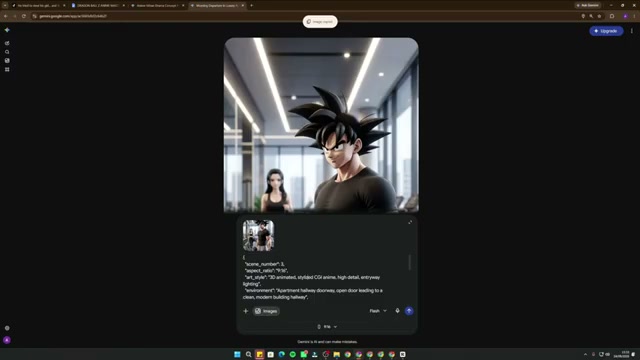
Prompt / Settings:
Aspect Ratio: 9:16 (Vertical)
Style: 3D animated stylized CGI anime, high detail, dynamic cinematic lighting
Reference Method: Chain previous scene output image as visual reference for the subsequent scene prompt
Step 3: Configure Project Settings in Google Flow [Timestamp: 00:05:34]
Open Google Flow and create a new project. Configure the video generation canvas parameters to match the prompt requirements for short-form video monetization.
Prompt / Settings:
Mode: Video Ingredients
Aspect Ratio: 9:16 (Vertical)
Model: Omni 1.1 Flash
Quality: 720p
Duration: 6 seconds
Batch Count: 1x
Credit Cost: 10 credits per generation
Step 4: Animate Keyframes with Video Motion Prompts [Timestamp: 00:06:26]
Upload your generated scene keyframe into Google Flow and drag it into the Add Reference input area. Copy the corresponding Scene 1 Video Prompt from Phase 4 (including camera motion and character dialogue) and paste it into the prompt box. Hit generate. Omni 1.1 Flash animates the character's facial expressions, mouth movements, and camera motion while generating synchronized character dialogue. Repeat this process for each scene across your free Google Flow daily credits.
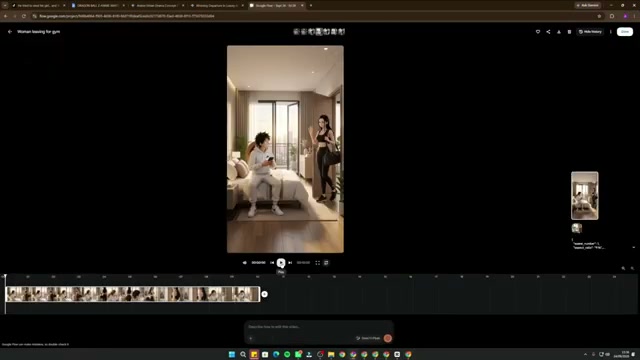
Step 5: Assemble, Auto-Caption, and Export in CapCut [Timestamp: 00:07:35]
Download all rendered video clips from Google Flow and import them into CapCut Desktop or Mobile. Arrange the clips sequentially on the timeline in narrative order (Scene 1 to Scene 15+). Trim any dead frames or pauses at clip boundaries to ensure snappy comedic and dramatic pacing. Use CapCut's Auto Captions feature to generate animated on-screen subtitles, customize the font style with bold outlines, and export the final 1-minute+ video in 1080p.
💡 Key Takeaways & Pro Tips
- Meet the 1-Minute Monetization Threshold: To monetize on TikTok's Creator Rewards Program, videos must exceed 60 seconds. Designing a 15–20 scene narrative structure where each scene runs 5–6 seconds guarantees a total runtime between 1:15 and 1:30.
- Image-to-Image Continuity Chaining: Generating characters from scratch per scene causes facial and outfit drift. Always feed the prior generated scene image back into Gemini when prompting the next scene to lock consistent 3D anime character features.
- Leverage Free Daily Credits: Google Flow provides 50 free credits daily per Google account (generating five 6-second clips). Rotating through 3 to 4 free accounts allows you to batch-render a full 20-scene mini-episode every single day without spending money on subscriptions.
📌 Original Source & Attribution
- Source Video: How to Make 1 MIN+ AI Anime DRAGON BALL Z Style Videos FREE (Master Prompt)
- Original URL: https://www.youtube.com/watch?v=Moh66BV_GYI
- Credit: AI ZenStudios