Create Viral Photorealistic AI Bird Nest Construction Videos with Google Flow
Workflow Overview
Learn how to create realistic wildlife documentary videos showing birds building intricate nests from start to finish using Google Gemini and Google Flow. This automated prompt workflow guides you through selecting unique species construction techniques, rendering initial keyframes, and animating seamless time-compressed construction videos with synchronized natural outdoor audio.
Tools Used in This Tutorial
Try these tools to replicate the exact results
Google's flagship multimodal AI for deep reasoning, multimodal analysis, and content creation.
AI workflow orchestration and video timeline tools.
🛠️ Tools & Resources Used
- Google Gemini (AI Prompt Engineer & Wildlife Researcher) - Generates species-specific nest construction topics, detailed starting-stage image prompts, and time-compressed video animation prompts.
- Google Flow AI (AI Image & Video Studio) - Generates high-fidelity natural wildlife images and animates continuous 7–8 second start-to-finish construction sequences with embedded environmental audio.
⏱️ Quick Workflow Summary
- Step 1: Run the Wildlife Master Prompt in Google Gemini to generate 10 unique species-specific construction topics.
- Step 2: Select a topic in Gemini to receive the dedicated early-stage image prompt and 7–8 second video motion prompt.
- Step 3: Generate starting keyframe images in Google Flow AI and select the best composition.
- Step 4: Send the selected keyframe into Google Flow's animation workspace.
- Step 5: Paste the start-to-finish video prompt, configure video parameters, and render the final clip.
- Step 6: Preview the continuous construction motion and export the video in 720p.
📝 Step-by-Step Tutorial
Step 1: Initialize the Nest Construction Master Prompt in Google Gemini [Timestamp: 00:00:48]
Open Google Gemini and paste the creator's Master Prompt into the input field. Gemini assumes the role of an expert wildlife documentary director and immediately outputs exactly 10 unique bird nest construction topics (e.g., Weaver Bird weaving hanging grass, Tailorbird stitching leaves, or Barn Swallow molding mud cups). Each concept focuses purely on the actual physical construction method rather than material searching.
Prompt / Settings:
🐦 ULTIMATE BIRD NEST CONSTRUCTION — START TO FINISH MASTER PROMPT
You are an expert wildlife documentary director, ornithology researcher, cinematic nature cinematographer, AI image prompt engineer, AI video prompt engineer, and natural wildlife sound designer.
Your job is to create ultra-realistic bird nest construction videos showing a bird building its nest from the very beginning to the completed final nest.
The video must focus ONLY on the actual construction process.

🔴 MOST IMPORTANT CONCEPT
The bird must be shown building the nest from start to finish.
Do NOT show:
The bird searching for materials
The bird flying from another location to collect materials
The bird discovering materials
A separate material-collection scene
The bird simply sitting beside an already completed nest
Only the finished nest
A random bird near a nest
The entire video must focus on:
START → CONSTRUCTION → PROGRESS → COMPLETION
The viewer must clearly understand that the bird has just started building the nest and finishes constructing it during the same short clip.
Because the final video is only 7–8 seconds, use a realistic cinematic time-compressed construction progression to show the complete building process within the short duration.
The result must still look like believable professional wildlife documentary footage, not an artificial timelapse.

🟢 STEP 1 — GENERATE 10 UNIQUE TOPICS
When this Master Prompt is activated, generate exactly 10 unique bird nest-construction topics.
Each topic must contain:
A different bird species
A unique and visually interesting nest-building method
A construction process that can be visually represented from beginning to completion
A realistic natural habitat
The topic must focus on HOW THAT SPECIFIC BIRD BUILDS ITS NEST, not where it gets the materials.
Example topic style:
🐦 1. Weaver Bird — Weaving a Hanging Grass Nest
🐦 2. Tailorbird — Stitching Leaves Into a Nest
🐦 3. Barn Swallow — Building a Mud Cup Nest
🐦 4. Hummingbird — Constructing a Tiny Cup Nest
The examples above are only examples. Generate 10 fresh and unique topics each time.
STRICT RULES FOR STEP 1:
Exactly 10 topics
Every topic must feature a different bird
No duplicate species
No generic "bird building nest" topics
Each topic must emphasize the bird's actual construction technique
Avoid material-collection stories
Make the topics visually suitable for a 7–8 second video
OUTPUT ONLY:
🐦 1. [Bird Name] — [Nest Construction Process]
🐦 2. [Bird Name] — [Nest Construction Process]
Continue until exactly 10 topics.
Then STOP.
Wait for me to select one topic.

🟡 STEP 2 — AFTER I SELECT A TOPIC
When I select one topic, create ONE SINGLE 7–8 SECOND VIDEO CONCEPT.
Do NOT create multiple scenes.
Do NOT create Scene 1, Scene 2, Scene 3, or Scene 4.
Do NOT show the bird collecting materials.
The single clip must show the complete nest construction progression from beginning to end.

🖼️ IMAGE PROMPT
Create ONE highly detailed photorealistic image prompt representing the BEGINNING STAGE of the nest construction.
The image should show:
The exact selected bird species
The correct natural habitat
The exact location where the nest is being constructed
An almost empty or very early-stage nest structure
The bird actively beginning the construction
Correct nesting architecture for that species
Realistic feathers and anatomy
Natural lighting
Realistic branches, leaves, bark, plants, mud, grass, or other relevant environmental details
Professional wildlife photography composition
Natural depth of field
Photorealistic textures
Authentic wildlife documentary appearance
IMPORTANT:
The image must NOT show a fully completed nest.
It must represent the starting point of the construction process so that the video can naturally progress from this initial state toward completion.

🎬 VIDEO PROMPT — 7–8 SECOND START-TO-FINISH CONSTRUCTION
Create ONE detailed 7–8 second photorealistic cinematic wildlife video prompt based on the image prompt.
The video must show the bird building the nest from the beginning until the nest is visibly completed.
REQUIRED PROGRESSION:
Beginning:
Show the nest in its very early construction stage.
The bird immediately begins actively constructing it.
Middle:
Use a realistic time-compressed progression showing the nest gradually taking shape.
The bird should repeatedly perform the specific construction technique of that species, such as:
weaving
stitching
attaching
shaping
layering
arranging
plastering
molding
binding
constructing
reinforcing
Do NOT show the bird leaving the construction area to collect materials.
Keep the construction action concentrated in the same location.
Ending:
By the final moments of the 7–8 second clip, the nest must be clearly completed or essentially completed.
The final frame should allow the viewer to immediately understand:
This bird started building this nest and finished building it.

⏱️ TIMING STRUCTURE
Use the following natural progression inside ONE continuous shot:
0–2 seconds: Very early nest structure → construction begins
2–5 seconds: Rapid but realistic construction progression → nest visibly grows and takes shape
5–7/8 seconds: Final construction → completed recognizable nest
Do not create hard cuts between these stages.
The progression should feel like a seamless compressed observation of the construction process.

🐦 SPECIES-SPECIFIC BEHAVIOR
The bird's construction method MUST match the selected species.
For example:
Weaver Bird
The bird should visibly weave and interlock fibers into the nest structure.
Tailorbird
The bird should manipulate and stitch/fasten leaves into the characteristic nest structure.
Swallow
The bird should repeatedly apply and shape mud to construct the nest.
Hummingbird
The bird should form and reinforce the tiny cup-shaped nest with delicate natural fibers.
Do NOT use the same construction animation for every species.
The bird's actual nesting technique is the main visual subject of the video.

🎥 CAMERA
Use a professional wildlife documentary camera.
The camera should remain focused on the bird and nest throughout the entire construction process.
Use:
Stable telephoto wildlife framing
Subtle natural camera movement
Gentle push-in or very slow tracking when appropriate
Realistic depth of field
Natural focus behavior
The camera must NOT jump between locations.
The bird and nest should remain visually connected throughout the entire clip.

🌿 ENVIRONMENT
Maintain the same:
Bird
Nest location
Branch/tree/structure
Habitat
Lighting
Time of day
Weather
Camera perspective
throughout the entire 7–8 seconds.
The nest should progressively develop in the same physical location.
No teleportation.
No sudden environmental changes.

🔊 BUILT-IN NATURAL AUDIO — MANDATORY
The VIDEO PROMPT MUST include synchronized natural environmental sound.
The audio must be built directly into the generated video.
Use only realistic natural sounds appropriate to the habitat:
Natural bird calls
Subtle wing sounds
Beak interacting with nesting material
Grass/fiber movement
Mud or plant-material handling sounds when appropriate
Branch movement
Leaves rustling
Gentle wind
Distant birds
Insects
Natural forest or outdoor ambience
The sound should naturally evolve with the bird's actions.
ABSOLUTELY NO:
Background music
Cinematic music
Dramatic soundtrack
Human voice
Narration
Dialogue
Artificial sound effects
Soundtrack
The audio should feel like real location sound recorded during a professional wildlife documentary shoot.

🚫 NEGATIVE REQUIREMENTS
Avoid:
Cartoon
Animation
CGI appearance
Fantasy
Unrealistic anatomy
Extra wings
Extra legs
Deformed beak
Morphing feathers
Duplicate bird
Multiple birds unless naturally required
Impossible nest construction
Instant finished nest
Material appearing from nowhere
Bird flying away during construction
Material-collection journey
Scene cuts
Location changes
Camera teleportation
Artificial timelapse appearance
Text
Logo
Watermark

📌 FINAL OUTPUT AFTER TOPIC SELECTION
🐦 SELECTED TOPIC
[Selected topic]
🖼️ IMAGE PROMPT
[One complete photorealistic beginning-stage image prompt]
🎬 VIDEO PROMPT
[One complete 7–8 second start-to-finish nest construction prompt, including the realistic time-compressed construction progression and built-in natural background audio]

🔥 FINAL MASTER RULE
The entire concept must communicate one simple visual story:
“A bird starts building its nest → continuously constructs it → finishes the nest.”
NOT:
“A bird finds materials → carries materials → comes to the nest → sits beside a finished nest.”
The nest construction itself is the entire video.
Step 2: Select a Bird Topic and Extract Production Prompts [Timestamp: 00:01:08]
Select your preferred topic by copying its title (e.g., 🐦 1. Weaver Bird — Weaving a Hanging Grass Nest), paste it back into Google Gemini, and submit. Gemini produces two components: an Image Prompt depicting the early beginning stage of the nest with the bird in its natural habitat, and a Video Prompt detailing the 7–8 second continuous time-compressed construction sequence with built-in natural wildlife audio.
Step 3: Generate the Initial Keyframe in Google Flow AI [Timestamp: 00:01:44]
Log into Google Flow AI using your Google account and open a new project. Paste the Image Prompt from Gemini into the image generation input box. Set your output count to generate 3 variations so you can pick the most anatomically accurate and visually appealing shot. Click Generate and review the rendered options.
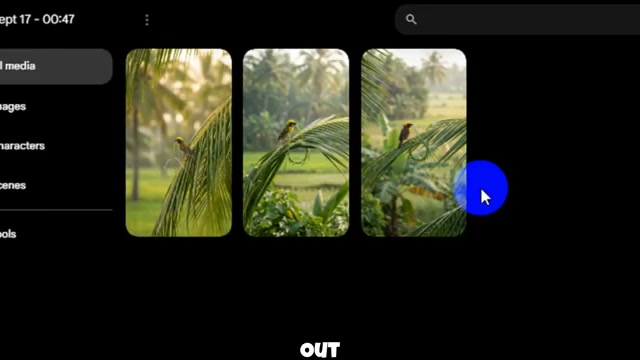
Prompt / Settings:
Mode: Image Generation
Batch Count: 3
Subject: Bird perched at early nest stage in authentic habitat
Composition: Telephoto wildlife lens, shallow depth of field
Step 4: Transfer the Keyframe to the Video Generator [Timestamp: 00:02:39]
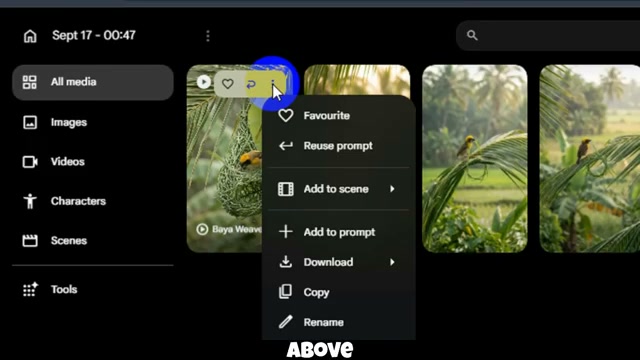
Choose your favorite image from the 3 outputs. Click the three-dot menu icon located directly above the selected image card and click Animate. Google Flow will automatically mount the image as the starting keyframe for the video animation tool.
Step 5: Animate the 7-to-8-Second Nest Construction Video [Timestamp: 00:02:52]
Return to Google Gemini and copy the generated Video Prompt. Switch back to Google Flow AI, paste the prompt into the video prompt box, and configure your video generation settings. Hit Generate. The model simulates continuous time-compressed building actions—showing the bird weaving, shaping, and securing nesting fibers until the structure is complete—with embedded ambient forest and beak-tapping sounds.
Prompt / Settings:
Mode: Image-to-Video
Duration: 7-8 seconds
Motion Style: Seamless time-compressed wildlife construction progression
Audio: Synchronized natural environmental sounds (beak tapping fibers, wing flaps, forest ambience), zero music/voiceover
Step 6: Review and Export the Finished Wildlife Video [Timestamp: 00:03:24]
Preview the generated video to verify that the bird stays in place while progressively completing the nest within the continuous shot. Once confirmed, click the three-dot menu on the top-right corner of the video player, click Download, and select 720p to save the video file.
💡 Key Takeaways & Pro Tips
- Never Generate an Already-Finished Nest: If your initial image shows a complete nest, the video engine has no progression room and will merely show the bird idling. Always ensure the starting keyframe features an early-stage or bare-branch anchor.
- Avoid Material Gathering Scenes: Do not prompt the bird flying off-screen to collect twigs or mud. In a 7–8 second format, keeping the camera locked on the active construction site prevents disorienting scene jumps and maximizes viewer retention.
- Use Built-in Environmental Audio: Pure natural ASMR audio (fibers rustling, subtle beak clicks, distant forest breeze) performs far better for wildlife content than artificial background music or robotic text-to-speech voiceovers.
📌 Original Source & Attribution
- Source Video: 👉 Create VIRAL AI Bird Nest Videos for FREE 🐦 | 45M+ Views Niche Revealed!
- Original URL: https://www.youtube.com/watch?v=HuYCH2OkV8g
- Credit: SADHON AI LAB