How to Create Realistic Nature ASMR Videos for YouTube & Facebook Monetization Using AI
Workflow Overview
Learn how to generate ultra-realistic nature ASMR video loops for YouTube Shorts and Facebook Reels using generative AI workflows. This tutorial covers reverse-prompting reference scenes, generating high-resolution base images, and animating fluid river dynamics with state-of-the-art video models like Kling, Seedance, and Google Flow.
Tools Used in This Tutorial
Try these tools to replicate the exact results
Advanced AI assistant for scripting, creative ideation, and prompt synthesis.
AI video generation and character motion tool tailored for mobile creators.
AI workflow orchestration and video timeline tools.
Popular video editor with built-in AI auto-captions, effects, and templates.
🛠️ Tools & Resources Used
- ChatGPT (LLM & Vision / DALL-E) - Used for reverse-prompting reference screenshots into detailed generation prompts and creating free base images.
- Higgsfield AI (AI Image Generator) - Used to generate photorealistic 4K 9:16 nature images and multishot variations.
- Kling AI (AI Video Generator) - High-fidelity video generation model used to animate natural water turbulence and foliage motion.
- Seedance (AI Video Generator) - Alternative video generator tested for image-to-video nature loops.
- Google Flow AI (AI Video Generator) - Free tier alternative tested for image-to-video generation.
- CapCut (Video Editing & Color Grading) - Used to apply earthy, natural color grading filters to eliminate synthetic AI artifacts.
⏱️ Quick Workflow Summary
- Step 1: Reverse-engineer a reference nature scene by screenshotting a viral reel and generating a prompt via ChatGPT.
- Step 2: Generate high-resolution 4K base nature images using Higgsfield AI (or ChatGPT Image Creator for free).
- Step 3: Animate the still image into a fluid ASMR video loop using motion prompts in Kling AI or Seedance.
- Step 4: Color grade and polish the video in CapCut to soften digital artifacts and produce an authentic ASMR aesthetic.
📝 Step-by-Step Tutorial
Step 1: Reverse-Engineer Reference Aesthetics with ChatGPT [Timestamp: 01:25]
Find an authentic, high-performing nature video (such as a viral nature ASMR Facebook Reel). Take a clear screenshot of the river or forest scene, upload it to ChatGPT, and request a prompt that captures the lighting, atmosphere, and organic details of the environment.
Prompt / Settings:
Create an image prompt that will produce the image I uploaded.
Step 2: Generate Photorealistic 4K Base Images [Timestamp: 02:05]
Head over to an image generator such as Higgsfield AI. Select the Image generation section and paste the detailed nature prompt provided by ChatGPT. Set the aspect ratio to 9:16 vertical video format, choose 4K resolution, and configure the style to Auto before generating 3 to 4 variations. You can also leverage multishot features to produce multiple camera angles from a single scene concept.
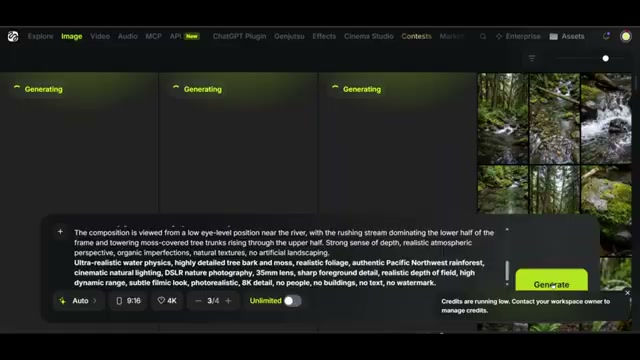
Prompt / Settings:
Aspect Ratio: 9:16
Resolution: 4K
Style: Auto
Quantity: 3-4 images
Step 3: Animate Water & Leaves via Image-to-Video [Timestamp: 02:59]
Take your generated vertical nature still and import it into an AI video generator like Kling 3.0 or Seedance. Paste the dedicated motion prompt to enforce a locked-off camera while generating natural, high-turbulence water flows and subtle vegetation breeze.
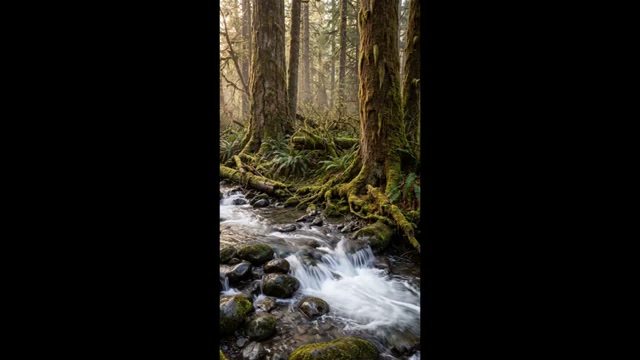
Prompt / Settings:
Fast, powerful river current flowing continuously downstream, strong natural turbulence, small waves, swirling eddies, splashing and whitewater forming around rocks. Hanging moss, leaves, ferns, and thin branches move gently in the natural breeze. Camera remains completely static and locked off. No camera movement.
Step 4: Apply Color Grading to Eliminate 'AI Slop' Artifacts [Timestamp: 03:48]
AI video engines can occasionally produce a plastic sheen or oversaturated lighting that signals synthetic content. Import your generated video clips into CapCut or your preferred editor and apply dark or warm earthy/brown filters to blend the shadows and water reflections into a realistic natural tone.
Step 5: (Optional Free Route) Google Flow AI Generation [Timestamp: 04:25]
If you prefer a 100% free workflow, generate the initial image directly in ChatGPT (DALL-E) using the descriptive prompt. Next, navigate to Google Flow AI, upload your generated image to the prompt field, insert the river animation prompt, and render your video clip without upfront tool costs.
💡 Key Takeaways & Pro Tips
- Lock Off the Camera: Always specify that the camera is completely static in your video motion prompts. Moving cameras frequently cause perspective warping and liquid morphing in AI engines.
- Color Grading Blends Artifacts: Adding subtle film grain, muted contrast, or earthy color filters removes the hyper-smooth plastic look that viewers instantly associate with low-quality AI content.
- Monetization Opportunities: Nature ASMR short-form content can qualify for Facebook In-Stream Ads, Stars, and YouTube Shorts revenue shares due to exceptionally high watch times and loop replay rates.
📌 Original Source & Attribution
- Source Video: Nature ASMR to Make Money on Youtube and Facebook!! FREE AI.
- Original URL: https://www.youtube.com/watch?v=RSKutIxy51k
- Credit: Sebastian Hardy