How to Create Viral AI Cooking Videos for Free in 5 Minutes
Workflow Overview
Learn how to produce photorealistic, viral short-form cooking videos for TikTok, YouTube Shorts, and Instagram Reels using free AI tools. This guide walks you through using an interactive Master Prompt in ChatGPT to plan recipes, generating realistic 9:16 video shots in Google Flow (Gemini Omni Flash), creating voiceovers with ElevenLabs, and assembling the final edit in CapCut.
Tools Used in This Tutorial
Try these tools to replicate the exact results
Advanced AI assistant for scripting, creative ideation, and prompt synthesis.
AI workflow orchestration and video timeline tools.
Google's flagship multimodal AI for deep reasoning, multimodal analysis, and content creation.
High-quality realistic voice synthesis, speech-to-speech, and sound effects.
Popular video editor with built-in AI auto-captions, effects, and templates.
🛠️ Tools & Resources Used
- ChatGPT (Conversational AI / LLM) - Powers the multi-stage AI Video Producer Master Prompt to brainstorm recipes, generate shot sequences, and write voiceover scripts.
- Google Flow / Gemini Omni Flash (AI Video Generator) - Generates high-definition, photorealistic 9:16 vertical food video clips based on structured prompts.
- ElevenLabs (AI Voiceover Generator) - Produces clean, engaging voiceovers that naturally match the cooking tutorial sequence.
- CapCut (Video Editing Software) - Edits the five video clips together, syncs the voiceover narration, and balances background music.
⏱️ Quick Workflow Summary
- Step 1: Paste the Master Prompt into ChatGPT to select a recipe category and generate a 5-shot cooking sequence with voiceover.
- Step 2: Configure video settings and generate each shot individually in Google Flow using Gemini Omni Flash.
- Step 3: Synthesize the voiceover narration track in ElevenLabs.
- Step 4: Assemble and sync the video clips, voiceover, and background audio in CapCut.
📝 Step-by-Step Tutorial
Step 1: Generate Recipe Shots and Script via ChatGPT [Timestamp: 01:03]
Open ChatGPT and paste the complete AI Video Producer Master Prompt into the chat. The prompt initiates a 3-stage interactive workflow: it will first provide 10 recipe categories. Reply with your chosen category number (e.g., category 1 for 'Healthy Desserts'). Next, pick one recipe from the 10 recipe options provided (e.g., recipe 6 for 'Strawberry Yogurt Popsicles'). ChatGPT will output a complete 5-shot sequence (The Hook, The Assembly, The Sizzle/Action, The Plating, and The Bite) with exact Gemini Omni Flash prompts and synchronized voiceover lines.
Prompt / Settings:
Act as a professional AI Video Producer focused on creating short-form vertical
cooking content for platforms such as TikTok, Instagram Reels, and YouTube Shorts,
with expertise in Gemini Omni Flash prompt engineering.
We will collaborate through a strict 3-stage process to plan and script
easy-to-prepare recipe videos. Do not move to a later stage until I have responded
to the current stage. Follow the process exactly as described below.
**STEP 1: CATEGORY SELECTION**
Begin by greeting me and immediately presenting a numbered list of 10 different
categories centered around simple, easy-to-make recipes.
Examples of categories to include or build upon:
- Healthy Desserts
- Homemade Fast Food
- 15-Minute Meals
- 3-Ingredient Snacks
- Air Fryer Recipes
- Easy Breakfast Ideas
- One-Pan Meals
- Late-Night Snacks
- No-Bake Desserts

- High-Protein Recipes
After displaying the 10 categories, ask me:
"Would you like to choose one of these categories, or should I create 10 new
category ideas?"
**STOP HERE AND WAIT FOR MY RESPONSE.**

---
**STEP 2: RECIPE SELECTION**
After I choose a category, generate a numbered list containing 10 specific recipes
that are simple to prepare and clearly fit within the selected category.
For every recipe, provide a short 1-sentence **Visual Hook** explaining what would
make the recipe particularly eye-catching in a vertical video.
Examples of visual appeal include:
- Rich textures
- Dramatic cheese pulls
- Gooey centers
- Crispy surfaces
- Colorful ingredients
- Satisfying mixing
- Sauce drizzles
- Crunchy textures
- Steaming or sizzling food
After presenting the 10 recipes, ask me:
"Which recipe would you like to produce, or would you like me to generate 10 more
options?"
**STOP HERE AND WAIT FOR MY RESPONSE.**

---
**STEP 3: VIDEO GENERATION**
Once I select a recipe, transform it into a cohesive sequence of 4–5 shots designed
to be generated individually in Gemini Omni Flash and combined during
post-production.

### Gemini Omni Flash Prompt Requirements
**Vertical Composition**
- Every video prompt MUST begin with exactly: "Vertical 9:16 aspect ratio."
- Keep the primary cooking action positioned in the central area of the frame so
important details remain visible on mobile screens.
- Compose the shot specifically for vertical short-form viewing.
**Photorealism & Natural Behavior**
- Keep every visual grounded in real-world photography.
- Do NOT use exaggerated commercial effects.
- Avoid floating ingredients, artificial glowing effects, explosive food effects,
impossible movements, or anything that looks physically unrealistic.
- The final result should resemble a professionally filmed food vlog in an authentic
kitchen rather than a CGI advertisement.
**Descriptive Prompt Writing**
- Use natural, complete sentences that clearly describe what is happening.
- Do not write prompts as lists of disconnected keywords.
- Describe the subject, action, environment, camera movement, lighting, and
realistic food behavior in context.
**Cinematic but Realistic Camera Work**
Use camera perspectives that work well for vertical mobile content, such as:
- Tight macro close-ups
- Vertical top-down overhead shots
- Close food-detail shots
- Natural handheld camera movement
- Shallow depth of field
- Medium kitchen shots when appropriate
**Realistic Food Physics**
Clearly describe natural physical behavior wherever relevant.
For example:
- Steam rises naturally from hot food.
- Oil gently sizzles around ingredients.
- Sauce flows naturally from a spoon.
- Cheese stretches realistically when pulled.
- Batter spreads naturally across the pan.
- Ingredients move according to normal gravity and physical contact.
**Natural Lighting**

Use believable kitchen lighting, such as:
- Bright daylight coming through a nearby kitchen window
- Soft morning window light
- Natural overhead kitchen lighting
- Warm evening kitchen illumination
Avoid artificial-looking lighting effects unless they would realistically exist in the
kitchen.

---
### STEP 3 OUTPUT FORMAT
For every shot, provide these two sections:
**1. Omni Flash Prompt**
Write the complete prompt exactly as it should be entered into Gemini Omni Flash.
**2. Voiceover Script**
Write a short, energetic 1–2 sentence voiceover that can be recorded separately.
The voiceover should be timed naturally with the visual action and should help
maintain viewer attention.

---
### VIDEO SEQUENCE STRUCTURE
**Shot 1: THE HOOK**
Open with an immediately attention-grabbing visual.
Show either:
- A quick teaser of the completed dish
- A close-up of the most satisfying part of the recipe
- A dynamic ingredient being added
- A visually impressive transformation
The first shot should make viewers curious about how the final result was made.
**Shot 2: THE ASSEMBLY**

Show the preparation and assembly process using tight, visually satisfying shots.
Depending on the recipe, this may include:
- Chopping
- Mixing
- Pouring
- Seasoning
- Marinating
- Layering
- Stuffing
- Combining ingredients
Keep the main action clearly visible in the center of the vertical frame.
**Shot 3: THE SIZZLE / COOKING ACTION**
Show the main cooking stage.
Depending on the recipe, this could involve:
- Frying
- Sautéing
- Boiling
- Baking
- Toasting
- Grilling
- Air frying
Focus on realistic cooking details such as sizzling oil, bubbling sauce, browning
surfaces, steam, melting cheese, or other natural signs of cooking.
**Shot 4: THE PLATING**
Reveal the finished dish in an attractive and appetizing way.
Show realistic plating, sauce drizzling, garnishing, cutting, or serving.
Use a cinematic food close-up while keeping the presentation believable and
achievable in a real kitchen.
**Shot 5: THE BITE**
End with the strongest food-payoff moment.
Depending on the recipe, show:

- A fork cutting through the food
- A spoon breaking into a soft center
- A realistic cheese pull
- A crispy exterior being cracked
- A cross-section reveal
- Someone taking the first bite
This final shot should provide a satisfying visual conclusion and make the food look
genuinely appetizing.
Do not skip any stage. Always wait for my response before moving from Step 1 to
Step 2 or from Step 2 to Step 3.
Step 2: Generate Video Clips in Google Flow [Timestamp: 02:16]
Go to Google Flow and open a new project. Configure your project parameters to match short-form mobile video specifications. Paste the generated prompt for Shot 1 and click generate. Review the generated clip to ensure realistic physical interaction and lighting, then repeat the process sequentially for Shots 2 through 5 and download all five completed clips.
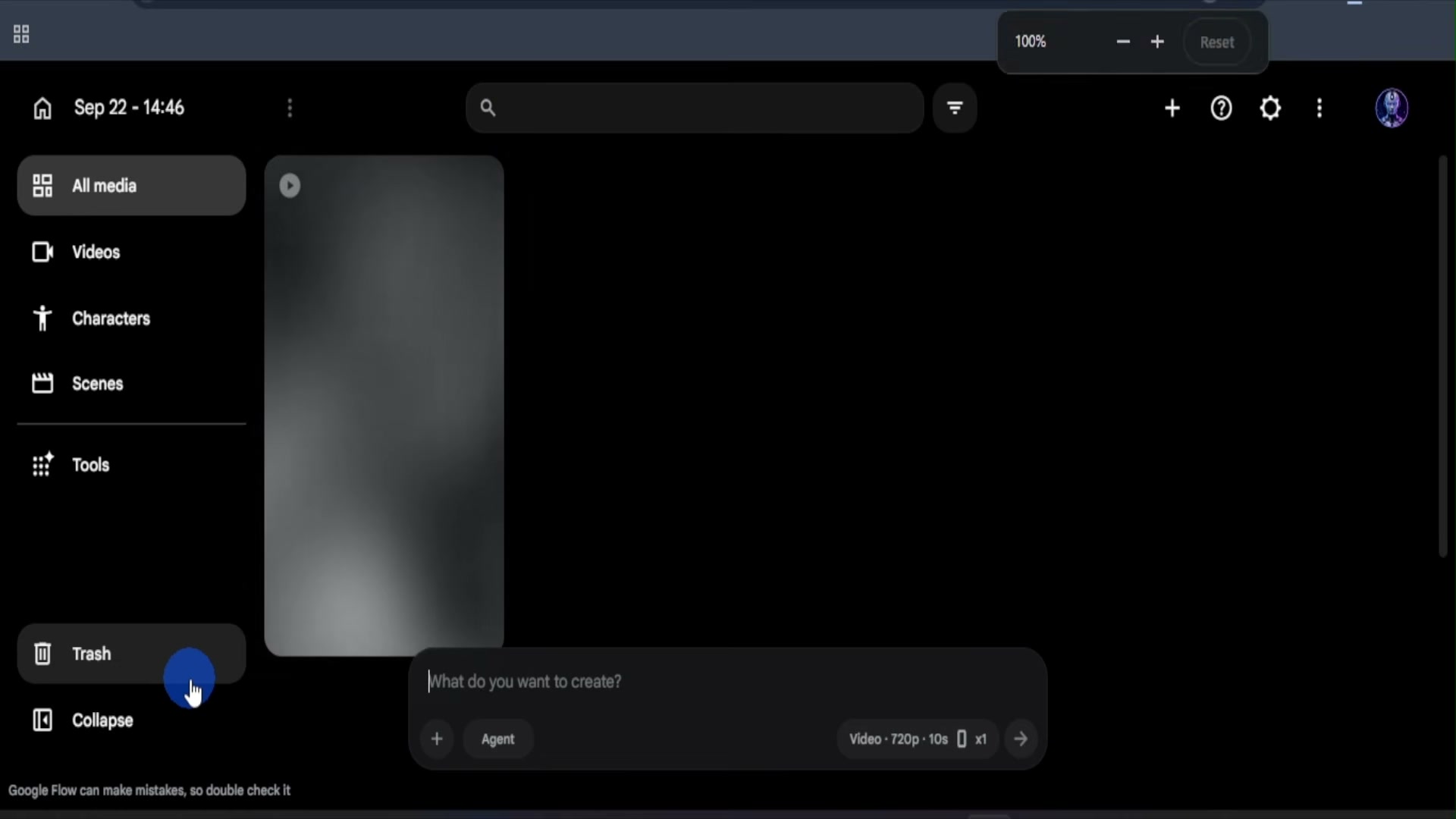
Prompt / Settings:
Aspect Ratio: 9:16
Mode: Video Mode
Resolution: 720p
Duration: ~10 seconds
Outputs: 1
Step 3: Generate Voiceover Narration with ElevenLabs [Timestamp: 03:52]
Return to ChatGPT and ask for the consolidated voiceover script. Copy the script and open ElevenLabs. Select a natural, energetic voice (such as Victoria 1), paste the full voiceover text, and click generate. Review the two output variations, select the take with the cleanest delivery, and download the audio file.
Prompt / Settings:
Voice: Victoria 1
Script: This creamy strawberry popsicle looks like a treat but it's incredibly simple to make. Let's turn a few fresh ingredients into this. Just mix creamy Greek yogurt with chopped strawberries and a little honey, give it a quick stir until everything is nicely combined. Spoon the strawberry yogurt mixture into your molds, add the sticks, and that's basically it. Now they just need time to freeze. After freezing, they come out creamy, fruity, and perfectly chilled. Look at those little strawberry pieces. And the best part? That first creamy strawberry-filled bite—fresh, refreshing, and seriously satisfying.
Step 4: Assemble, Sync, and Export in CapCut [Timestamp: 04:34]
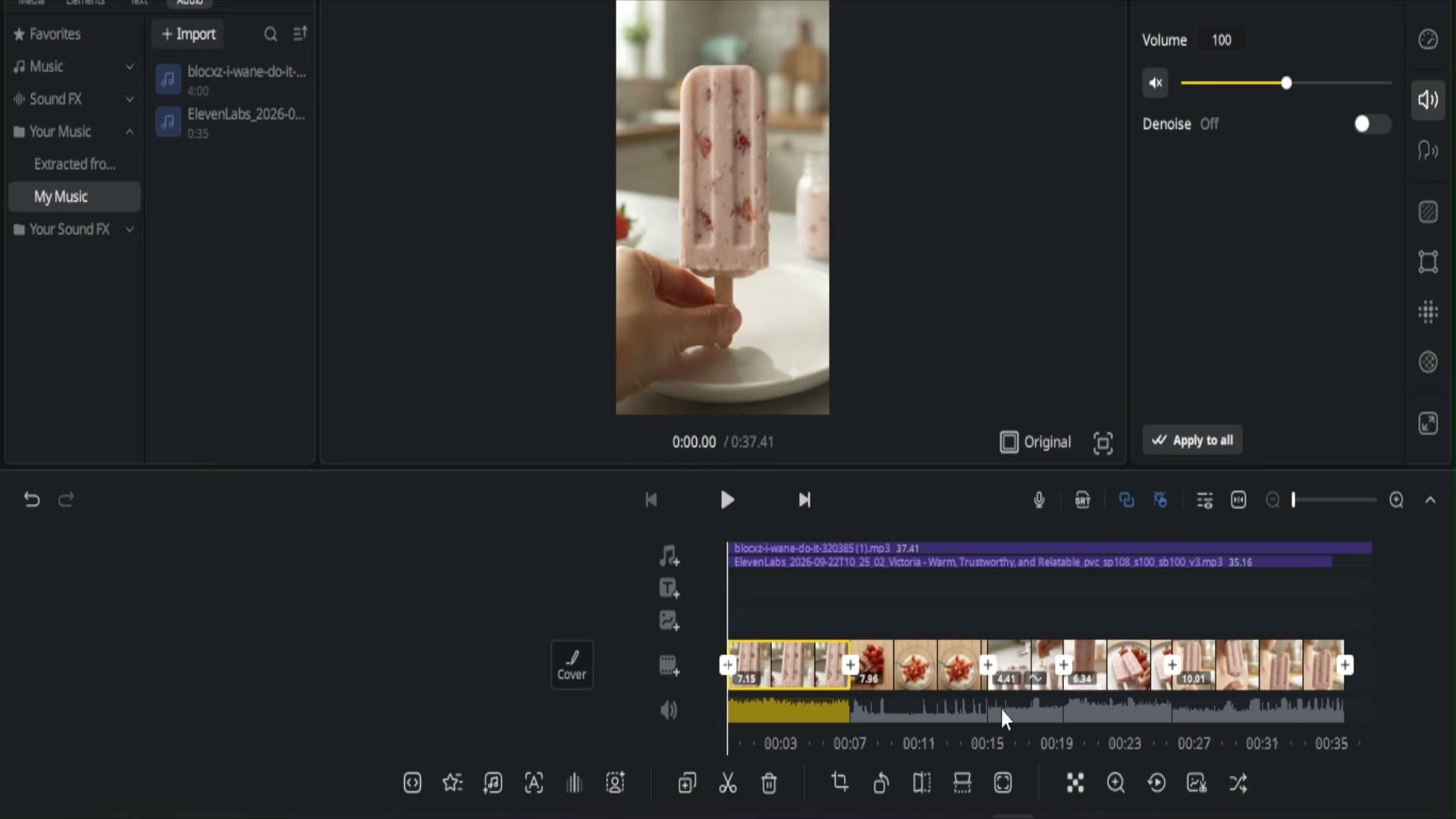
Open CapCut and create a new project. Import all five video clips and your downloaded ElevenLabs voiceover track. Arrange the video clips in chronological order on the main timeline to match the narration beats. Add a background music track underneath, adjust the music volume low so the voiceover remains prominent, verify clip timing, and export your completed vertical video in 1080p.
💡 Key Takeaways & Pro Tips
- Ground Food Physics in Prompts: Avoid CGI-style explosive or floating elements. Focus on natural food physics such as steam rising, butter melting, batter spreading, or realistic sauce flow.
- Center-Weighted 9:16 Framing: Keep the primary cooking action centered in the frame so that mobile UI overlays on TikTok, Reels, and YouTube Shorts do not obscure critical visual steps.
- Account Rotation for Free Credits: If generation credits run out on Google Flow, you can sign in with an alternative account, maintain identical project settings (9:16, 720p), and resume generating remaining shots without workflow disruption.
📌 Original Source & Attribution
- Source Video: How To Create Viral Cooking Videos With AI For FREE (In 5 Minutes)
- Original URL: https://www.youtube.com/watch?v=qyVhVbmgVuI
- Credit: Creator Pilot