How to Make Viral Dancing Pet Videos with AI in 5 Minutes (Google Flow Tutorial)
Workflow Overview
Learn how to create realistic, viral dancing pet videos for TikTok, YouTube Shorts, and Instagram Reels in just 5 minutes using free AI tools. This tutorial guides you through using a dedicated Custom GPT for character consistency and Google Flow (NanoBanana Pro and Omni Flash models) to render and animate your pet in any real-world location.
Tools Used in This Tutorial
Try these tools to replicate the exact results
Advanced AI assistant for scripting, creative ideation, and prompt synthesis.
AI workflow orchestration and video timeline tools.
🛠️ Tools & Resources Used
- Dancing Pet Custom GPT (LLM & Prompt Assistant) - Guides character design, scene placement, and animation prompt engineering across three dedicated stages.
- Google Flow (NanoBanana Pro) (AI Image Generator) - Generates high-fidelity, photorealistic vertical base images with character and location consistency.
- Google Flow (Omni Flash) (AI Video Generator) - Animates static standing pet images into fluid, natural dance performances.
⏱️ Quick Workflow Summary
- Step 1: Select a pet type in the Dancing Pet Custom GPT to generate an upright character-lock prompt.
- Step 2: Generate the upright pet reference image in Google Flow using the NanoBanana Pro model.
- Step 3: Place the pet into a custom real-world environment using the Stage 2 placement prompt and image reference.
- Step 4: Animate the pet's dance routine using the Omni Flash video model in Google Flow.
📝 Step-by-Step Tutorial
Step 1: Generate Character Lock Prompt in Dancing Pet GPT [Timestamp: 00:30]
Open ChatGPT, navigate to Explore GPTs, search for Dancing Pet, and start a chat session. Click on Choose Pet to display the available animal categories. Select your desired animal (for example, choose cat). The GPT will generate a detailed character-lock prompt specifically structured to create an upright standing animal reference.
Step 2: Render the Upright Pet Reference Image [Timestamp: 01:03]
Open Google Flow and create a new image generation canvas. Configure the canvas settings to vertical format and select the NanoBanana Pro model. Paste the character lock prompt received from the GPT and click generate to render a clean, high-resolution reference of your pet standing upright on two legs. Download this image and upload it back into the Dancing Pet chat to lock in character identity.
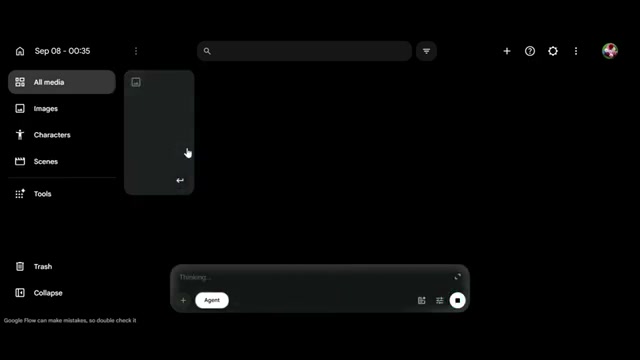
Prompt / Settings:
Aspect Ratio: 9:16 Vertical
Model: NanoBanana Pro
Step 3: Blend Pet into a Real-World Environment [Timestamp: 01:26]
In the Dancing Pet GPT chat, proceed to Stage 2: Placement. When asked for a setting, enter your desired location (e.g., 'in front of the White House'). The GPT will craft a placement prompt that retains your pet's visual features while situating it naturally in the environment. Head back to Google Flow, upload your upright pet reference from Step 2 as an image input, paste the placement prompt, and generate the composite image.
Prompt / Settings:
Location: in front of the White House
Reference: Attach Step 2 upright pet reference image
Step 4: Animate the Dancing Pet with Omni Flash [Timestamp: 02:13]
Upload your composite environment image back into the Dancing Pet GPT to enter Stage 3: Animation. The GPT will output a motion prompt tailored for natural dance movements. Return to Google Flow, click the three-dot menu on your placed pet image, select Animate, and switch the mode to video generation. Paste the animation prompt, choose the Omni Flash video model, set the duration to 10 seconds, and generate your final video.
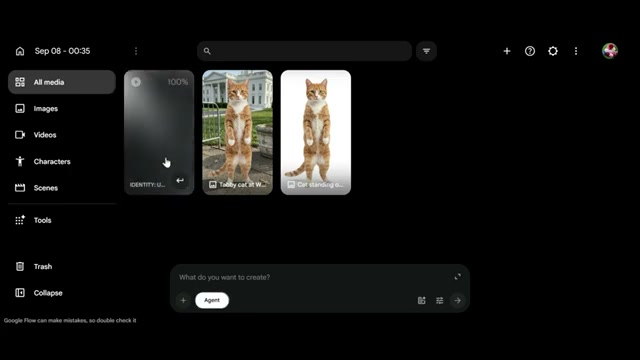
Prompt / Settings:
Mode: Video Generation
Aspect Ratio: 9:16 Vertical
Model: Omni Flash
Duration: 10 seconds
💡 Key Takeaways & Pro Tips
- Two-Step Image Composition: Do not try to generate the pet and the complex background simultaneously on the first pass. Generating an isolated upright reference first ensures the animal's anatomy and fur details remain consistent when composited into the location.
- Use Upright Poses for Natural Motion: Generating the initial pet standing upright on its hind legs provides the video diffusion engine with the proper anatomical foundation required to render believable human-style choreography.
- Vertical 9:16 Optimization: Keep all image and video renders strictly in 9:16 vertical orientation to maximize reach and engagement across TikTok, Instagram Reels, and YouTube Shorts.
📌 Original Source & Attribution
- Source Video: How to Make Viral Dancing Pet Videos with AI in 5 Minutes! 🐶 | Google Flow Tutorial
- Original URL: https://www.youtube.com/watch?v=BkOkwttwFPI
- Credit: Nine Tech