Turn Messy Product Photos into a Luxury E-Commerce Website with ChatGPT Astra & Higgsfield
Workflow Overview
Learn how to transform amateur mobile product photos into high-end editorial fashion shoots and a fully responsive luxury boutique website using ChatGPT Astra and Higgsfield via MCP. This tutorial walks through setting up AI agent workflows, generating cohesive garment and accessory imagery, rendering an animated video hero header, and fine-tuning web layouts for mobile and desktop.
Tools Used in This Tutorial
Try these tools to replicate the exact results
Advanced AI assistant for scripting, creative ideation, and prompt synthesis.
AI video generation and character motion tool tailored for mobile creators.
🛠️ Tools & Resources Used
- ChatGPT (GPT-4o / Astra) (AI Agent & Orchestrator) - Acts as the creative director, handling project planning, layout design, prompt logic, and executing external tool actions via MCP.
- Higgsfield MCP (AI Generation & Tool Integration) - Connects directly into ChatGPT to generate professional editorial fashion photos, generate video animations, and assemble the live web page.
- Cloudflare Pages (Web Hosting / Deployment) - Used as an optional free hosting solution to deploy custom HTML/CSS exports and map custom branded domain names.
⏱️ Quick Workflow Summary
- Step 1: Connect the Higgsfield MCP integration to ChatGPT and initiate your design workspace.
- Step 2: Upload product reference photos and define the core luxury brand aesthetic and inquiry mechanism.
- Step 3: Generate and audit sample product shoots (apparel & accessories) to ensure strict physical fidelity.
- Step 4: Generate and review desktop and mobile website UI layout previews.
- Step 5: Create an animated cinematic video hero banner using Higgsfield.
- Step 6: Harmonize the product catalog grid and align typography to finalize and publish the live site.
📝 Step-by-Step Tutorial
Step 1: Connect Higgsfield MCP to ChatGPT [Timestamp: 01:25]
Open ChatGPT and navigate to your account settings or plugins/integrations section. Locate the Higgsfield MCP connector and authorize access to link your existing Higgsfield account with ChatGPT. Open a new chat session and ensure you select the advanced agent model (Astra).
Step 2: Upload Product References & Define the Boutique Concept [Timestamp: 01:48]
Upload all your raw, amateur mobile photos of garments, bags, and brand reference materials directly to the chat. Give the AI agent an overarching design brief specifying the color palette, target tone, device responsiveness, and initial sample requirements before generating the full site.
Prompt / Settings:
Create a premium boutique website for this collection with an ivory and burgundy palette, subtle gold accents, and cinematic scrolling, designed for both desktop and mobile. Before generating the full site, ask me clarifying questions about how customers will use it, and create just one garment shoot and one bag shoot for my approval first.
Step 3: Approve High-Fidelity Editorial Product Shoots [Timestamp: 02:22]
Answer the agent's intake questions: specify the preferred model, customer contact route (such as WhatsApp for custom orders), and typography preferences. Review the two generated sample images side-by-side against the raw phone photos. Check that fabric embroidery, necklines, leather textures, and hardware match the physical items accurately.
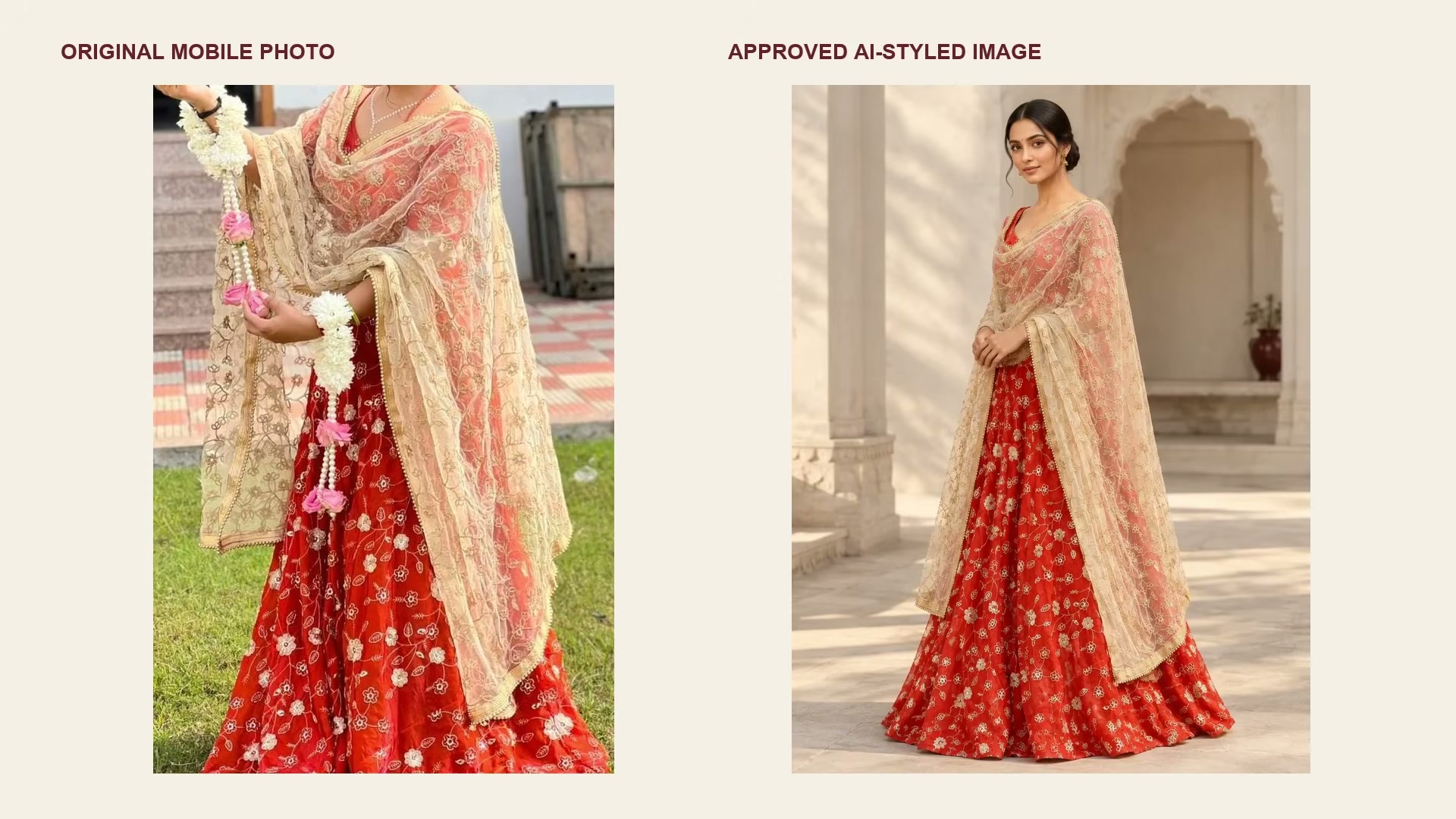
Step 4: Generate & Refine Website Layout Previews [Timestamp: 03:36]
Once the visual aesthetic is approved, instruct the agent to generate design previews for both desktop and mobile screen viewports. Evaluate the visual hierarchy, headline scales, call-to-action buttons, and bilingual font pairings. If typography or elements feel misaligned or too heavy, provide incremental, specific feedback rather than requesting an entire redesign.
Prompt / Settings:
Refine the hero section heading: reduce the font size slightly, switch to a lighter font weight, and select an elegant, clean font for the Hindi branding tagline that matches the original reference proportions.
Step 5: Animate the Cinematic Hero Video [Timestamp: 04:17]
Transform the approved editorial garment photo into an animated hero background loop using Higgsfield. Prompt for subtle, organic subject motion and gentle camera moves while strictly omitting any embedded AI-generated text overlays so that headlines can be rendered cleanly via HTML.
Prompt / Settings:
Using the clean approved fashion photo shoot image as reference, generate a subtle video loop with no added text or lettering. Camera motion: slow cinematic push-in moving closer to the model. Subject motion: gentle, natural turn and elegant posing. Vertical/horizontal framing matching the website hero banner.
Step 6: Standardize Catalog Grid, Review Viewports & Publish [Timestamp: 05:08]
Request the agent to apply the approved editorial lighting and styling across the remaining raw product photos. Ensure all catalog images share uniform aspect ratio frames on the homepage grid. Test the live page on desktop and mobile viewports to inspect button tap targets, line breaks, and responsive image crops before publishing or linking a custom domain.
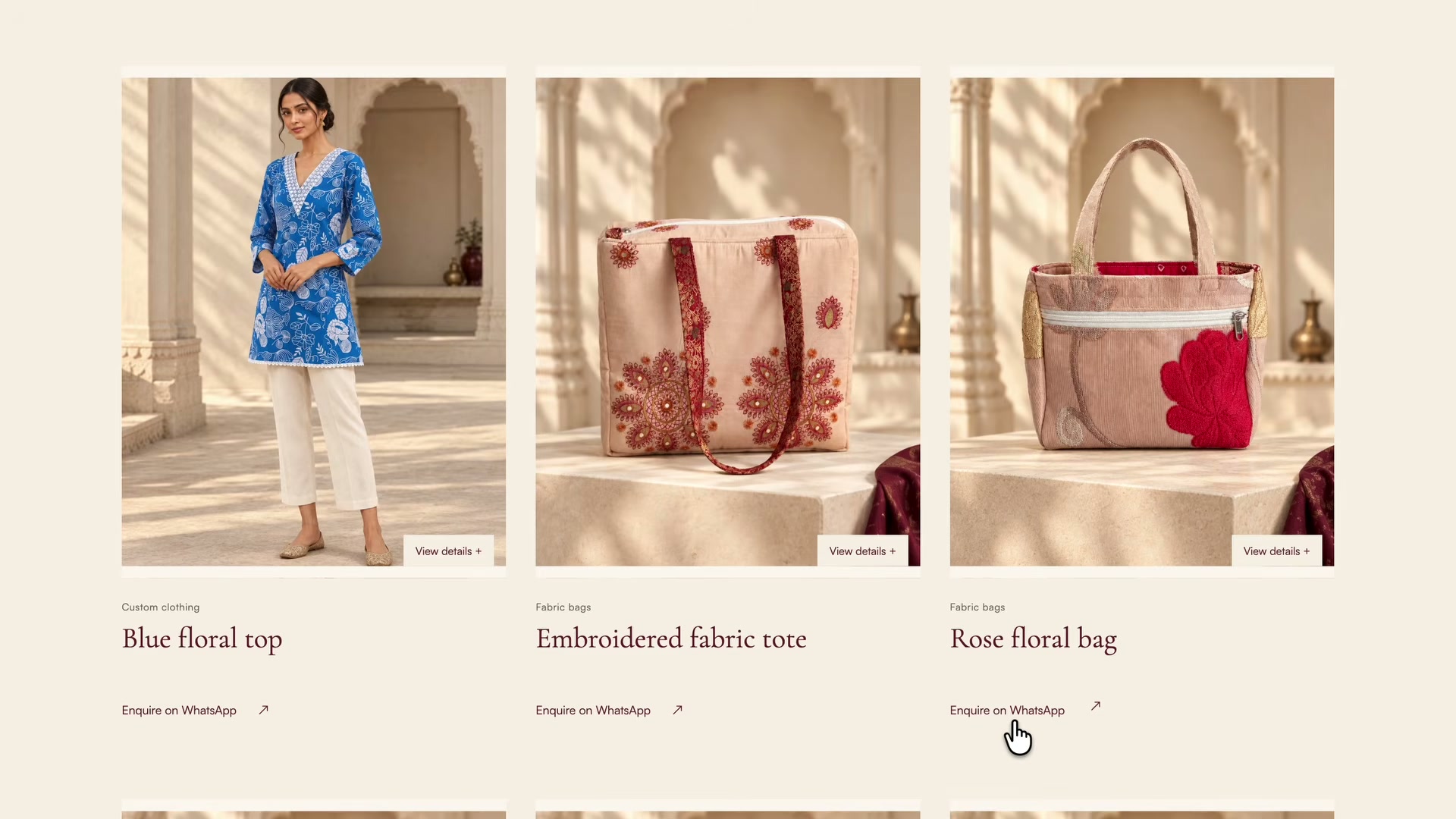
💡 Key Takeaways & Pro Tips
- Audit Product Fidelity Closely: An attractive AI model photo is useless for e-commerce if the garment's neckline, color, or embroidery patterns deviate from the actual inventory. Always compare reference photos side-by-side.
- Separate Camera & Subject Motion: When prompting video generation in Higgsfield, explicitly separate what the subject does (e.g., 'gentle turn and pose') from what the camera does (e.g., 'slow cinematic push-in') to avoid unnatural warping.
- Keep Video Clean of Text: Never generate animated banners with embedded text or titles. Let the AI generate a clean visual video clip, and overlay web typography natively via HTML/CSS.
📌 Original Source & Attribution
- Source Video: Turning Messy Product Photos into a Luxury Website (ChatGPT Astra + Higgsfield)
- Original URL: https://www.youtube.com/watch?v=yYXaq_QZEVE
- Credit: GenAI with Keera