How to Create Viral Celebrity Clay Sculpting Shorts Using Free AI Tools
Workflow Overview
Learn how to produce high-retention viral YouTube Shorts and TikTok videos featuring step-by-step celebrity clay sculpting. This end-to-end workflow utilizes an interactive LLM master engine, chained AI image-to-video generations, and smart timeline overlays to capture millions of views with 100% free AI tools.
Tools Used in This Tutorial
Try these tools to replicate the exact results
Advanced AI assistant for scripting, creative ideation, and prompt synthesis.
Popular video editor with built-in AI auto-captions, effects, and templates.
🛠️ Tools & Resources Used
- ChatGPT / Gemini (LLM Chatbot) - Runs the Viral Clay Sculpting Engine prompt to generate subjects, multi-stage concept plans, and chained image/video prompts.
- Pinterest (Image Search) - Used to source clean, high-resolution celebrity reference photos.
- Flow AI (AI Image & Video Generator) - Generates sequential clay sculpting image frames with locked style references and turns them into video clips.
- Kling AI (Kuaishou) (AI Video Generator) - Serves as a high-tier free backup for image-to-video generation if credits deplete or celebrity filters flag requests.
- CapCut (Video Editor) - Assembles video clips, applies smooth transitions, adds ASMR sound effects, and places the picture-in-picture celebrity hook overlay.
⏱️ Quick Workflow Summary
- Step 1: Run the Viral Clay Sculpting Engine Master Prompt in ChatGPT or Gemini to establish character and clip progression.
- Step 2: Select a viral celebrity and upload a reference photo from Pinterest to lock visual traits.
- Step 3: Generate iterative clay progression images in Flow AI using sequential image-to-image style references.
- Step 4: Animate clay sculpting image frames into video clips using Flow AI or Kling AI.
- Step 5: Assemble, overlay the celebrity picture-in-picture hook, and export in CapCut.
📝 Step-by-Step Tutorial
Step 1: Initialize the Master Sculpting Engine in Your LLM [Timestamp: 02:18]
Open ChatGPT, Google Gemini, or any preferred LLM chatbot. Paste the comprehensive viral clay sculpting master prompt into the chat window. This system prompt acts as an interactive state-based engine designed to plan a strict A-to-Z sculpting process (preventing the AI from generating a finished sculpture in early scenes) and outputs ready-to-use image and video prompts.
Prompt / Settings:
You are the Viral Clay Sculpting Video Engine v5. Your goal is to generate Flow AI prompts that show a strict, step-by-step sculpting process (A to Z). You must prevent the AI from generating the finished product in the early clips.
ACT IMMEDIATELY. Your first output is the subject list from STATE 1. Follow states in order. Stop and wait after each state.
CORE VISUAL FORMULAS
Camera & POV: First-person POV, close-up over sculptor's hands. Camera 100% locked.
The Armature: Clay figure mounted on a visible metal rod held by fingers.
Lighting: Bright, even studio lighting. Clean white table.
Audio: ASMR diegetic sound only (clay squish, tool scrape). No music.
STRICT PROGRESSION RULE (CRITICAL)
The video MUST show the sculpture being built from scratch.
Clip 1 must look like a rough, unfinished lump.
Clip 2 adds basic shapes.
Clip 3 adds limbs and clothes.
Clip 4 is the final polished result.
If the AI generates a finished-looking figure in Clip 1 or 2, the prompt has failed.
STATE 1 — SUBJECT SELECTION
Output 10 viral subjects (3 Athletes, 3 Pop-Culture, 2 Memes, 2 Cute).
End with: 'Pick a number (1–10), describe your own character, OR upload an image.' — STOP. WAIT.
STATE 2 — INTAKE
Uploaded image: Write a full visual description. This is the Locked Subject Block. Confirm: 'Got it. Moving to style.'
STOP. WAIT.
STATE 3 — STYLE & DIRECTIONS
Ask: 'Which style? (1) Hyper-Realistic Anatomical Bust OR (2) Caricature Bobblehead/Full Figure.' — STOP. WAIT.
Then output 5 concept directions. User picks one.
STOP. WAIT.
STATE 4 — CLIP PLAN (STRICT A-Z BUILD)
Output the plan for 4 clips (8-10s each). You must use this exact progression structure:
If Style A (Anatomical):
Clip 1: The Skeleton. White clay skull/ribcage base only. NO muscles, NO skin, NO hair.
Clip 2: The Muscles. Pink clay muscle fibers layered over the white skeleton. NO skin, NO hair.
Clip 3: The Skin. Flesh-toned clay draped over muscles. Face shaped, but NO hair, NO clothes, NO paint.
Clip 4: The Finish. Hair added, eyes painted, clothing/jersey sculpted and detailed. Final reveal.
If Style B (Bobblehead):
Clip 1: The Base Lump. A rough, smooth, egg-shaped head of flesh-toned clay on a stick. NO facial features, NO hair, NO body yet.
Clip 2: The Face. Basic eye sockets, nose, and mouth carved into the lump. Still rough. NO hair, NO body.
Clip 3: The Body & Hair. Tiny body attached, basic clothing shape added, hair texture started. Face refined but not fully painted.
Clip 4: The Details. Face fully painted (eyes, lips), hair fully styled, clothing details (logos, numbers) added. Mounted on green base. Final reveal.
End with: 'Type 'go' to generate the prompts.' — STOP. WAIT.
STATE 5 — LOCKED BLOCKS
Output LOCKED SUBJECT BLOCK and LOCKED SCENE BLOCK:
'First-person POV over sculptor's hands at a clean white work table. Hands hold a small clay figure on a visible metal rod. Bright, even studio lighting, shallow depth of field, sharp focus on clay. Camera locked. NO reference photos in frame.'
End with: 'Type 'go'.' — STOP. WAIT.
STATE 6 — CHAINED PROMPTS WITH NEGATIVE CONSTRAINTS
For each clip, output an IMAGE PROMPT and VIDEO PROMPT.
CRITICAL RULE FOR IMAGE PROMPTS: You must include a 'NEGATIVE CONSTRAINT' section in every image prompt to tell the AI what NOT to generate yet.
Format for each clip:
IMAGE PROMPT — CLIP 1:
[Locked Scene Block] + [Locked Subject Block] + [Description of Clip 1 state from Clip Plan] + 'NEGATIVE CONSTRAINT: Do not generate hair, do not generate clothes, do not generate finished facial features, do not generate painted eyes. The figure must look like a rough, unfinished base shape only.'
VIDEO PROMPT — CLIP 1:
Duration: 9 seconds. Speed: smooth real-time. Motion: Hands gently rotate the metal rod. A steel tool presses into the smooth clay to begin carving the basic eye sockets and nose indentations. The clay smoothly deforms under the tool. Camera locked. Sound: ASMR clay squish and tool scrape.
WORKFLOW NOTE FOR USER:
IMPORTANT: For Clip 1, DO NOT upload your finished character photo as the reference image in Flow AI. If you do, it will just copy the finished look. Instead, use a generic image of a 'rough clay lump' or just use the text prompt with no image reference.
IMAGE PROMPT — CLIP 2:
[Locked Scene Block] + [Locked Subject Block] + [Description of Clip 2 state] + 'NEGATIVE CONSTRAINT: Do not generate hair, do not generate clothes. The face should have basic carved features but no paint or fine detail yet.'
VIDEO PROMPT — CLIP 2:
Duration: 9 seconds. Speed: smooth real-time. Motion: Hands use a small tool to refine the lips and eyebrows. The clay surface becomes smoother and more defined. Camera locked. Sound: ASMR smoothing sounds.
WORKFLOW NOTE FOR USER:
For Clip 2, upload the IMAGE you generated for Clip 1 as the reference image in Flow AI.
IMAGE PROMPT — CLIP 3:
[Locked Scene Block] + [Locked Subject Block] + [Description of Clip 3 state] + 'NEGATIVE CONSTRAINT: Do not generate final painted details. The hair and clothes should look sculpted but not fully detailed or painted yet.'
VIDEO PROMPT — CLIP 3:
Duration: 9 seconds. Speed: smooth real-time. Motion: Hands attach small pieces of clay to form the hair and the basic shape of the clothing. The figure grows limbs. Camera locked. Sound: ASMR clay squish.
WORKFLOW NOTE FOR USER:
For Clip 3, upload the IMAGE you generated for Clip 2 as the reference image.
IMAGE PROMPT — CLIP 4:
[Locked Scene Block] + [Locked Subject Block] + [Description of Clip 4 state - THE FINISHED LOOK]. 'This is the final, fully detailed and painted result.'
VIDEO PROMPT — CLIP 4:
Duration: 9 seconds. Speed: smooth real-time. Motion: Hands use a fine brush to paint the eyes and lips. The sculptor adds final details to the clothing. The figure is rotated 360 degrees to show the finished masterpiece. Camera locked. Sound: ASMR brush strokes and tool taps.
WORKFLOW NOTE FOR USER:
For Clip 4, upload the IMAGE you generated for Clip 3 as the reference image.
STATE 7 — OUTPUT PACKAGE
Output Titles, Hashtags, Caption.
Add EDITING NOTE: 'Generate the 4 clean clips first. Then, open CapCut, place your original character photo in the top-left corner as an overlay, and add ASMR audio.'
End with: 'Type 'again' to restart.' — STOP. WAIT.
Step 2: Select Character & Lock Subject Reference [Timestamp: 02:47]
Pick one of the viral celebrity topics suggested by the prompt (e.g., Cristiano Ronaldo, Lionel Messi, or Spider-Man). Head over to Pinterest, find a crisp portrait of your chosen celebrity, and download it. In ChatGPT, upload this photo and choose your desired sculpting style (such as Caricature Bobblehead or Hyper-Realistic Bust) and concept pose. Once confirmed, reply with go to receive all tailored image and video prompts along with clip-by-clip negative constraints.
Step 3: Generate Progressive Clay Frames in Flow AI [Timestamp: 04:55]
Open Flow AI, start a new project, and configure your generation canvas. Switch the generation mode to image, select vertical 9:16 aspect ratio, and choose your image model. For the initial rough clay lump (Clip 1), generate using text alone or a generic clay lump reference. For subsequent clips, upload the best image from the preceding step into the style reference input to chain visual consistency across each sculpting stage (lump -> carved features -> hair/limbs -> polished final figure).
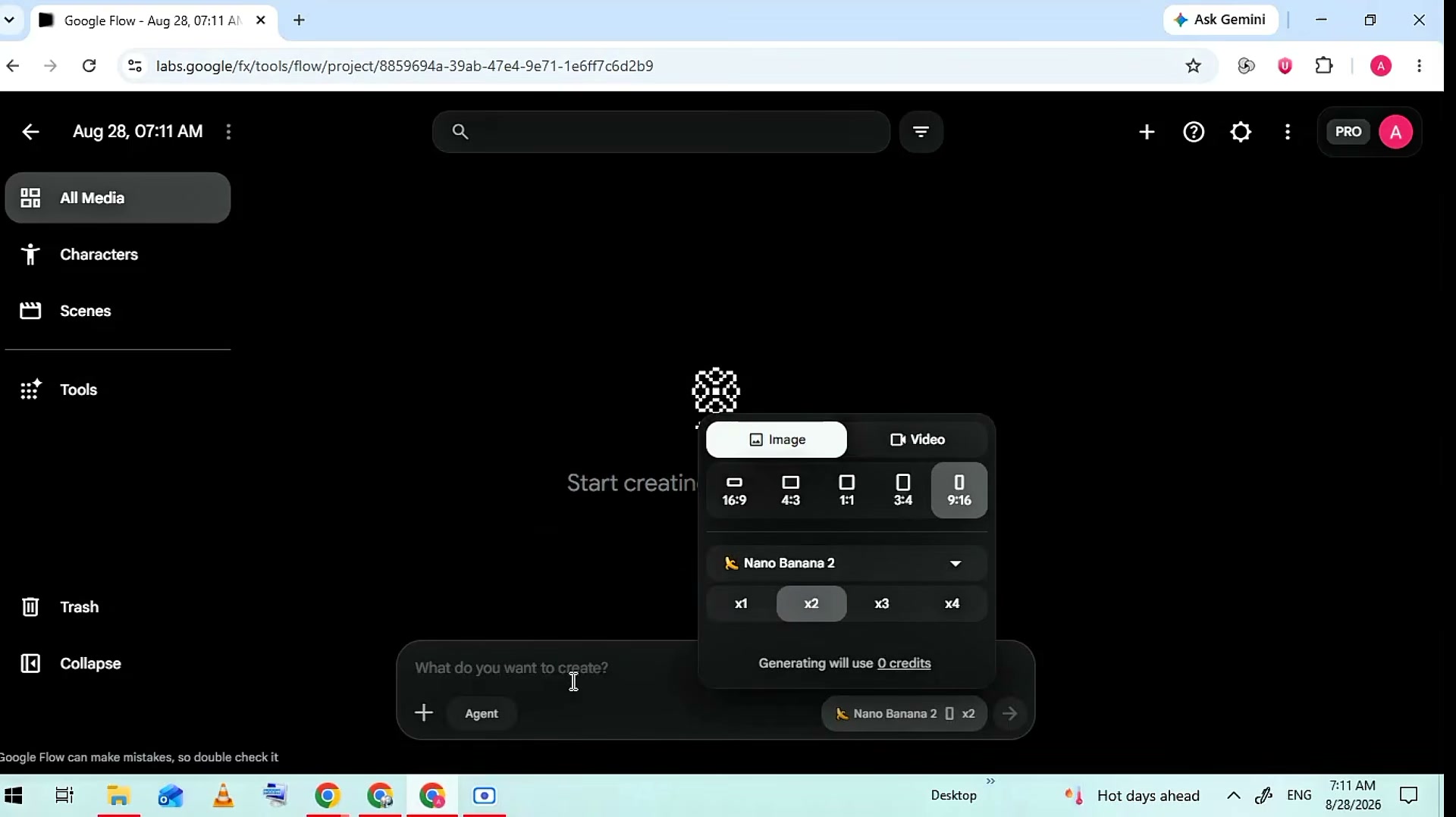
Prompt / Settings:
Aspect Ratio: 9:16
Number of Images: 2
Reference Image Mode: Style Reference
Prompt Chaining Rule: For Clip N, attach the winning generated image from Clip N-1 as the primary style reference.
Step 4: Animate Images into Video Clips Using Flow AI or Kling AI [Timestamp: 06:48]
Convert your progressive image frames into fluid video clips using your LLM-generated video prompts. In Flow AI, switch the mode to video, upload the corresponding clip frame, paste the motion prompt, and render. If free credits are depleted or celebrity moderation blocks the generation, head to Kling AI (klingai.com), create a 9:16 video generation, upload the image frame, and apply the real-time hands/tool sculpting motion prompt.
Prompt / Settings:
Duration: 5-10 seconds
Aspect Ratio: 9:16
Sample Motion Prompt: First-person POV over sculptor hands at a clean white table. Hands hold a clay figure on a visible metal rod. Hands gently rotate the metal rod while a steel sculpting tool refines facial features and smooths clay. Camera locked. 100% stable angle.
Step 5: Edit Sequence and Add Picture-in-Picture Hook in CapCut [Timestamp: 08:35]
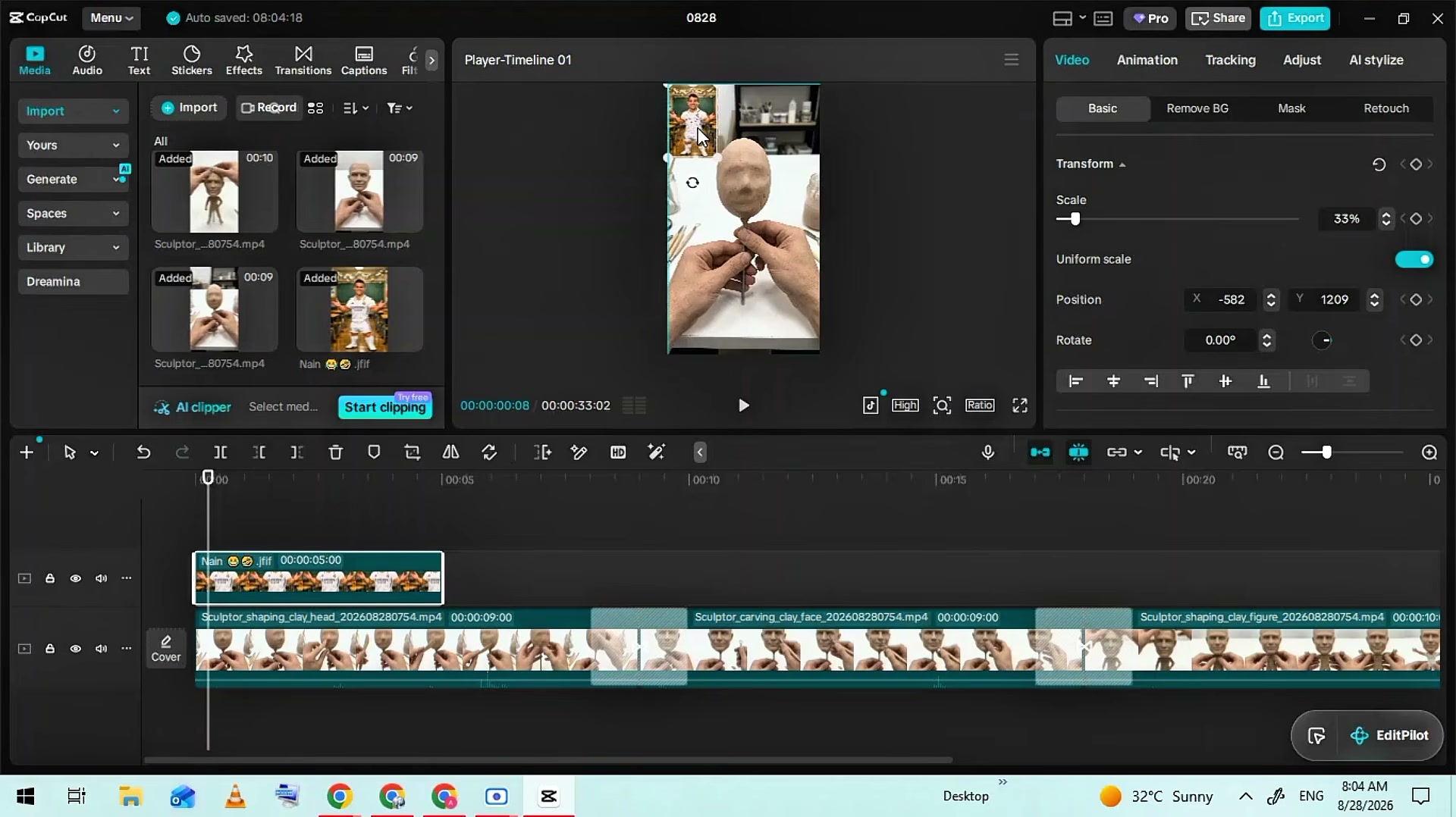
Launch CapCut and import all animated video clips alongside the original Pinterest celebrity reference photo. Sequence the clips sequentially on the main video track (Clip 1 to Clip 4) and insert brief, seamless transitions. Drag the celebrity reference photo onto an overlay track, shrink it down, and anchor it in the top corner throughout the entire short. Finally, overlay crisp ASMR clay squishing and scraping sounds, then export your video in 1080x1920.
💡 Key Takeaways & Pro Tips
- Transformation + Recognition Formula: The primary retention driver is seeing an unrecognizable lump turn into a beloved idol. If you reveal the finished sculpture in Clip 1, viewers lose the incentive to watch until the end.
- Preventing 'Instant Perfection': Never feed the finished celebrity photo into early image generation steps without negative constraints. Always constrain the AI to generate incomplete armatures and unpainted clay lumps for early clips.
- Bypassing AI Filters with Kling AI: Some AI platforms trigger copyright or likeness flags when processing celebrity names. Kling AI provides a robust free alternative that tolerates celebrity image inputs and maintains realistic hand motion.
📌 Original Source & Attribution
- Source Video: Create This New Secret Niche & Goes Viral In 48hrs (FREE Tools)
- Original URL: https://www.youtube.com/watch?v=hxjJuT4lPRs
- Credit: Ai pay you